A Claude artifact is anything Claude makes for you that you'd put in front of someone: a doc, a deck, a design, a dashboard or a small interactive tool. Since 24/11/2026 you can also install one as an app on your Mac or Windows computer, with its own icon, its own window and Claude still working inside it. The catch most people are getting wrong is sharing. On Pro, the parts of a shared artifact that use Claude don't work for your clients.
I've got a focus timer that now lives in my menu bar, and a call prep app that pings me 15 minutes before a client call and writes me a brief when I click it. Below is how to install one, what else artifacts can do now, and where I'd be careful.
Claude changes fast. I checked everything below against Anthropic's help pages on 25/11/2026. Saltbush Studio and its clients in the video (and in the screenshots here) are made up, and those app screens were rebuilt in code. The install steps, the Share dialog, the consult pack, the classroom and the onboarding map in the video are my real screens.
What is a Claude artifact?
Anthropic describes it as "anything Claude makes for you that you'd put in front of someone: a design, a deck, a document, a dashboard, or a small interactive tool." It opens beside your chat, you keep working on it with Claude, and everything you've made lives in the Artifacts tab in your sidebar.
Three things to know before you start:
- Artifacts work on every plan, Free included. If you can't make one, check Create and edit files is switched on under Settings, then Capabilities.
- Every artifact starts off private to you.
- If you use Claude Code, anything your session builds (a report, a little tool) can be published as an artifact too, and every update goes to the same link. No more emailing a client
final_v3_ACTUAL_final.pdf.
Anthropic's own guide is what are artifacts and how do I use them.
How do you install a Claude artifact as an app?
Build the artifact like normal, open it in the Claude desktop app and pick Install as app. Here are the steps:
- Update the Claude desktop app. You need version 6.28899.0 or later. On a Mac it's Claude, then Check for Updates. On Windows it's the ☰ menu, then Help, then Check for Updates. If you can't see the option, this is nearly always why.
- Ask Claude to build the app. Anthropic's own example is "Make a Pomodoro timer that lives in my menu bar." Try it as an artifact first.
- Open the artifact in the main Claude desktop window. Click the artifact's name to open its title menu (or right-click the artifact) and select Install as app. It's also under Share.
- Confirm. Claude always asks before it installs anything.
You should now have an icon that opens like any other app. On a Mac it lands in a Claude Apps folder inside the Applications folder in your home folder, and it shows up in Spotlight. On Windows it's in the Start menu under Claude Apps. You need to be online and signed in to Claude Desktop to open it.
Who gets it: it's in beta and rolling out on Free, Pro, Max, Ultra, Team and Enterprise. It's the desktop app only, so not the browser, not your phone and not Linux. On Enterprise, an owner has to switch it on first. And anything made from a template (Docs, Slides or Sheets) can't be installed.
To remove an app, go to File, then Apps in Claude Desktop, select it and choose Uninstall. That doesn't delete the artifact. Full details are in Anthropic's install an artifact as an app guide.
I've put the install steps, a permissions cheat sheet and the prompts for the apps in this post (call prep included) into a free guide, ready to copy.
What can an installed artifact app do?
Once you allow it, it can send you notifications, sit in your menu bar (or the system tray on Windows) and respond to keyboard shortcuts while you're in other apps. My focus timer lives in the menu bar: I click it, pick 25 minutes, and when time's up it pings me even if I'm in another app. Before this, it was a tab I would lose by lunchtime.
The bigger deal is that these apps can still use Claude and your connected apps. There's no API key and no separate login. It just uses your Claude account. And when you ask Claude to change the artifact, the app updates itself.
What it costs: building the app, and every request it makes to Claude, counts toward your plan's usage limits, like any other chat. So there's no API bill, but it isn't free usage either.
My call prep app
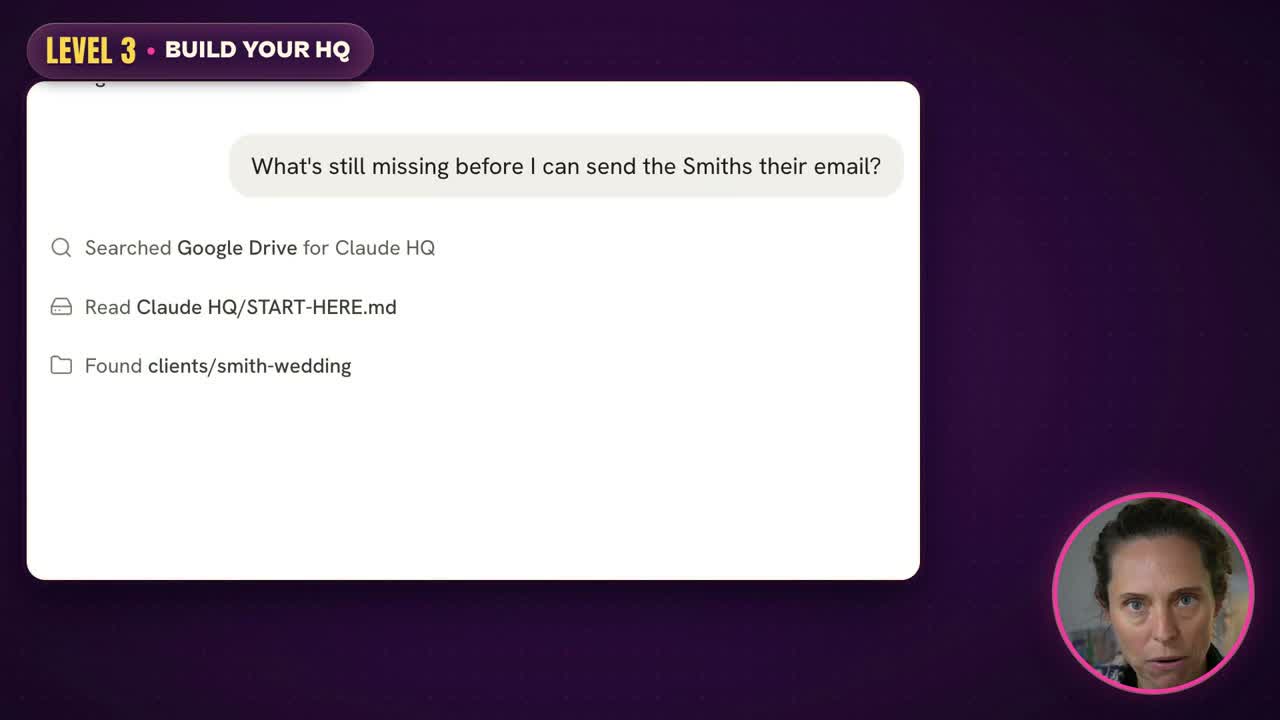
This is the one I'm most excited about. It checks my Google Calendar and pings me 15 minutes before a client call. When I click it, Claude pulls together a brief from my Gmail and Google Drive: who the client is, what we talked about last time (from our meeting transcript), anything they've sent me since, and 3 questions to ask.
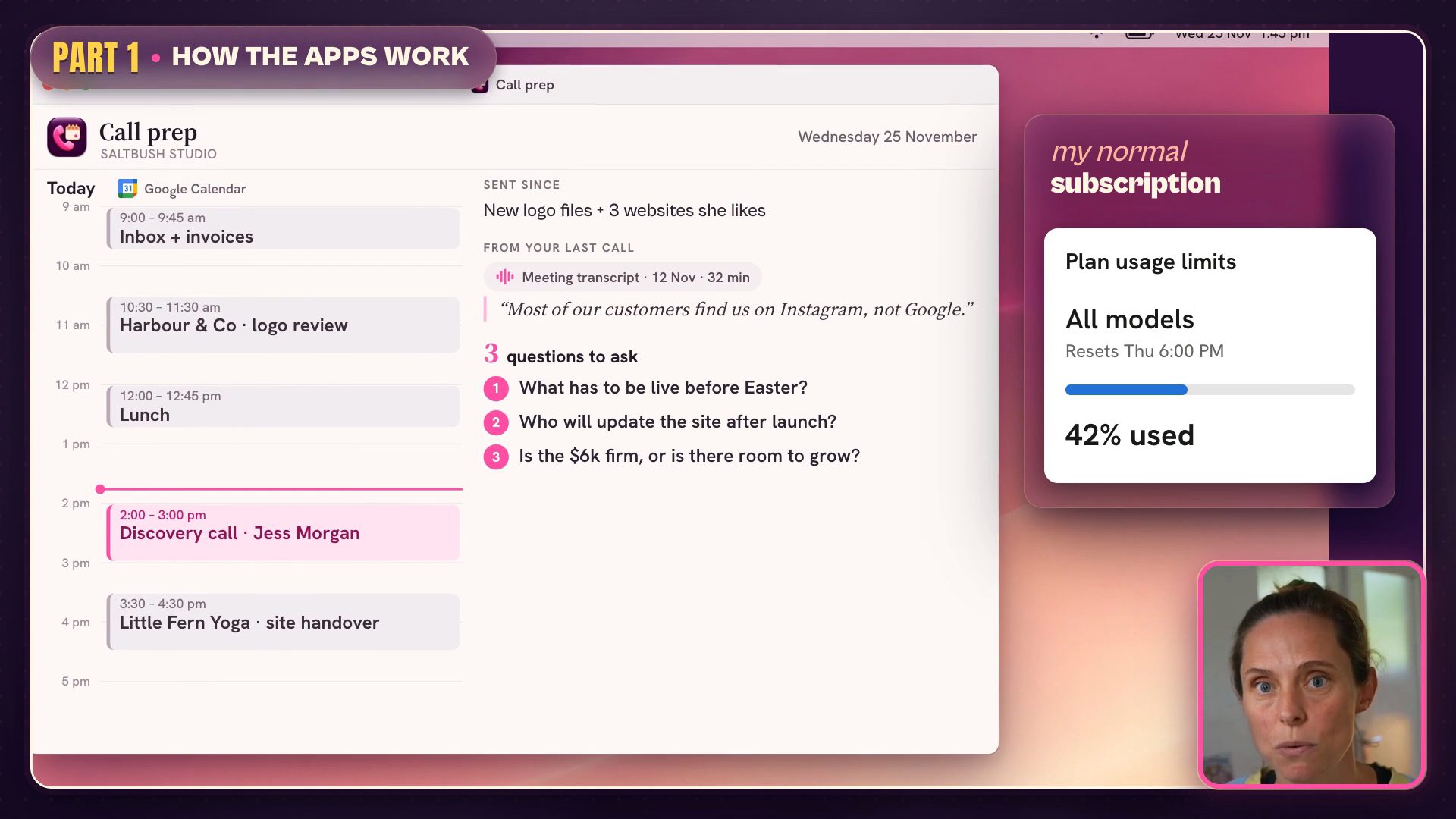
That's Claude working inside the app on my normal subscription. For it to work, Claude needs your Gmail, Calendar and Drive connected first. If you haven't done that yet, start with Claude connectors for Gmail and calendar.
Which permissions should you allow?
Each permission asks separately, with Allow or Don't allow. Here's what each one lets an app do, per Anthropic's guide:
- Notifications: show notifications while you use other apps.
- Keyboard shortcuts: respond to key combinations while you use other apps.
- Float over other windows: draw above other windows and read where your mouse cursor is.
- Menu bar item (Mac) or system tray icon (Windows): show an item there while the app is open.
- Full access to this computer: run programs and read, change or delete your files without asking each time.
The big one is full access. Only allow it on apps you built yourself. In Anthropic's own words: "Anthropic doesn't review apps before you install them."
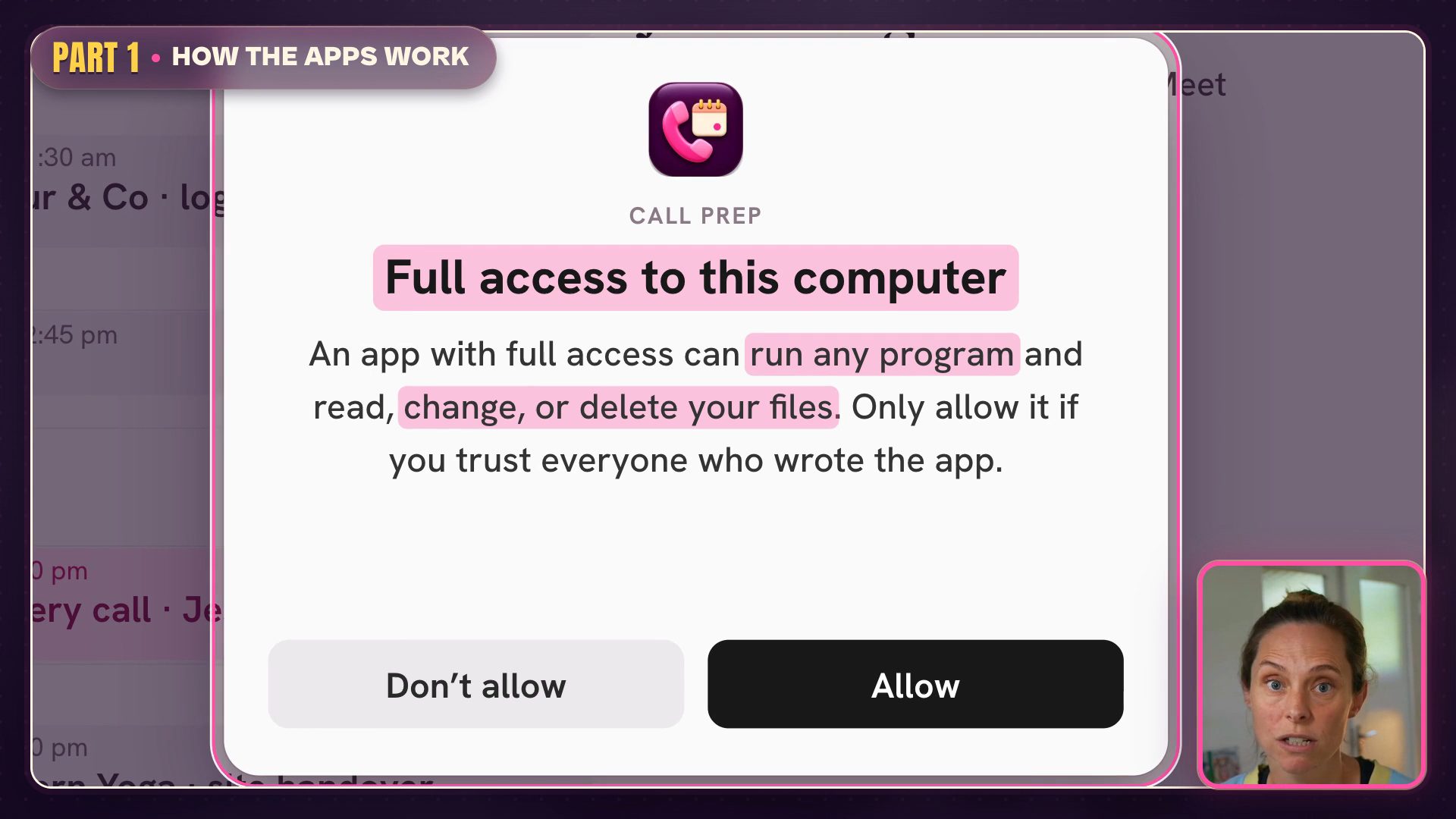
Two more things worth knowing. An Allow only covers one version of the app, so after any update (including your own edits) Claude asks again. And on Free, Pro, Max and Ultra, Claude generally won't let an app ask for full access if anyone other than you wrote part of it. On Team, full access stays off until an admin turns it on.
What else can Claude artifacts do now?
Apps are just the newest upgrade. If you haven't opened artifacts in a while, a lot has changed. By 08/10/2026, Anthropic said people had made more than 45 million docs, decks and designs in Claude.
The 7 templates, and which plans get them
| Template | What it's for | Free | Pro, Max, Ultra | Team | Enterprise |
|---|---|---|---|---|---|
| Docs | Living documents you write with Claude and your team | Yes | Yes | Yes | Yes |
| Slides | Decks from your notes, reports or chat, to present in Claude or export | Yes | Yes | Yes | Yes |
| Design | Visuals, mock-ups, prototypes, one-pagers and landing pages | Yes | Yes | Yes | Yes |
| Data | Dashboards and data stories from data platforms or connected apps; each chart shows its query | No | Yes | Yes | Yes |
| Sheets (beta) | Spreadsheets you and Claude edit in the same cells | No | Yes | Yes | Once an owner turns it on |
| Whiteboards (beta) | A shared board for thinking through ideas with Claude and your team | No | Yes | Yes | Once an owner turns it on |
| Motion (beta) | Animated explainers, charts and walkthroughs, exported as MP4 | No | No | Yes | Once an owner turns it on |
Source: Anthropic's artifacts guide. Motion is Team and Enterprise only for now, but surely it's coming to the rest of us.
Pages that save, connect and think
On Pro and above, an artifact can do three things a normal page can't:
- Save what you type into it. So it essentially has a database. A client tracker can remember every client, what stage they're at and what's due next. Each artifact holds up to 100 MB or 25,000 saved records. Whoever builds it decides whether saved data is private to each person or shared, so check before you type anything sensitive into someone else's.
- Read from and write to your connected apps, like Google Calendar, Asana or Slack. Everyone connects their own apps, even on a shared artifact.
- Call Claude. The page itself can answer questions, give feedback or write things for you.
How do you share a Claude artifact?
On Pro, Max and Ultra, open the artifact, hit Share and change "Only you" to Anyone with the link. You can also invite people by email (that's in beta). On Team and Enterprise, artifacts stay inside your organisation unless an owner has allowed outside sharing.
Treat a link like a public Google Doc link: anyone who has it can open it, so think about what you do and don't want out there. Most link-shared artifacts open without a Claude account. Docs and sheets are the exception: people have to sign in to Claude, and then they can only view.
The hard part was never getting Claude to make something. It was getting it in front of the person who needed it. You'd copy it into a Google Doc, screenshot it, or work out how to put a little web page online. Now you build it, hit Share and send the link.
Here's how I use it. Everyone who comes to one of my trainings gets a consult pack: the recording, the prompts we used, the answers to every question from the chat and their next steps. Until now I built those as little web pages and put them online myself. Now Claude builds the whole pack as an artifact from my session notes. When someone asks a question a week later, I ask Claude to add the answer, and the same link updates.
Can clients use a Claude-powered artifact you share?
Not on Pro, Max or Ultra. If you share an artifact by link with a client, the parts that use Claude or your connected apps won't work for them. On those plans, Anthropic counts anyone who isn't you as outside your organisation.
Inside a Team or Enterprise organisation it's different. Your colleagues can use a Claude-powered artifact you built, on their own usage, at no cost to you.
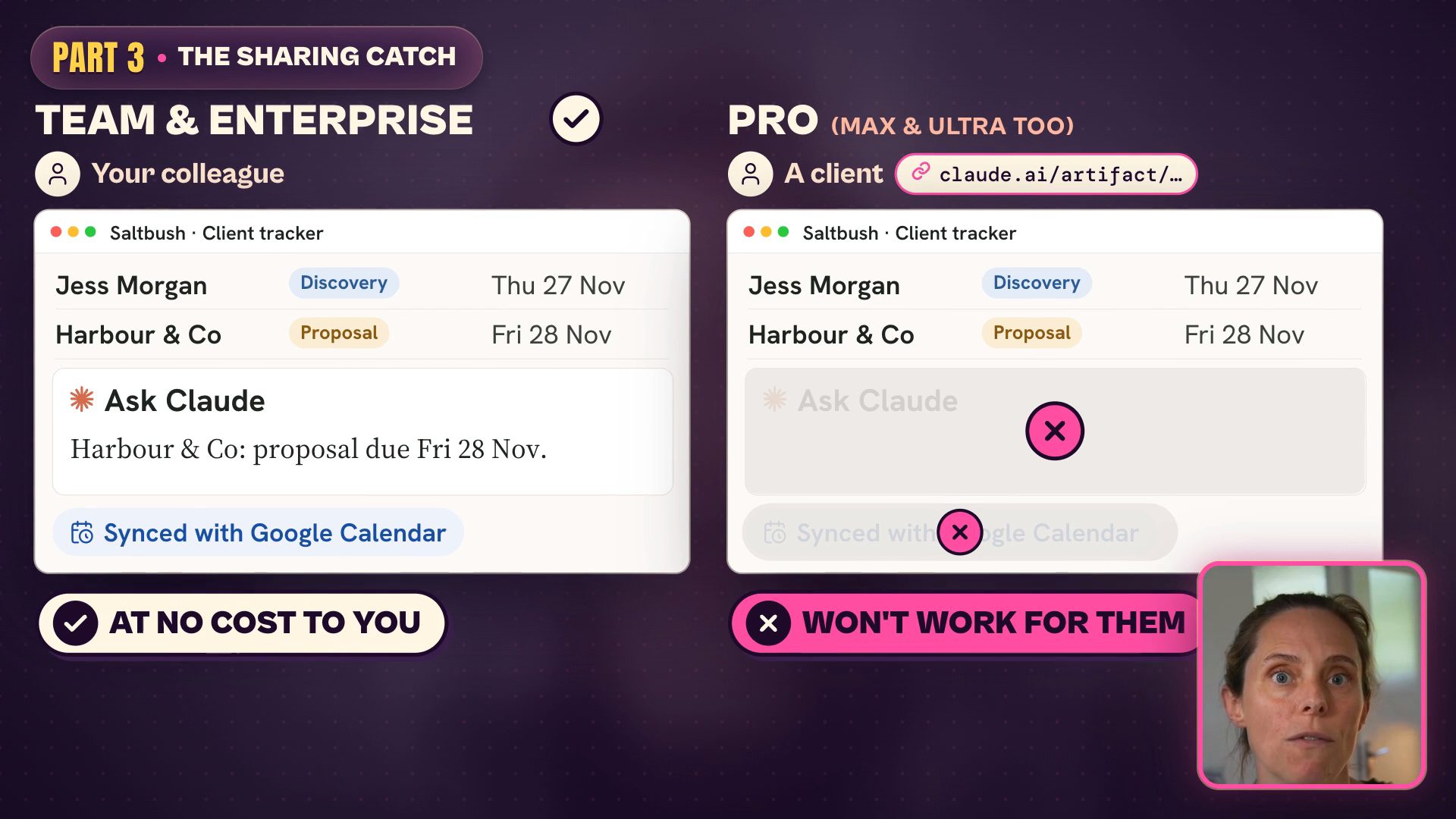
You'll hear that whoever uses your Claude-powered page runs it on their own plan, not yours. Anthropic's general artifacts page says that too. Its sharing page, checked the same day, is stricter, and that's the one I'd plan around until they match. Saved data has the same limit: people outside your organisation can read what's stored once they sign in, but they can't change it. So a tracker your clients fill in won't work on Pro either.
My take: build Claude-powered artifacts for yourself, not as a client portal. If you need clients logging in and using AI, that's a proper tool hosted on something like Vercel or Netlify. I've got training on building tools that sit outside Claude in my membership.
Where can clients use Claude? In Claude Docs
Claude Docs is where your clients can ask Claude for changes. Say I've written a client's website copy. I make it a Claude doc, hit Share, invite them by email and set them to Can edit. They highlight a line and comment "@Claude make this sound more like us". Their own Claude makes the change and explains what it did.
Two catches:
- Can edit means they can change anything. Only do this with clients, and work, you're happy for them to change.
- Don't also share it by link. If the doc is also shared with "Anyone with the link", their comments switch off.
They'll need a Claude account under the email address you invited, and Free plans can't send invitations. Anthropic's Claude Docs guide has the details.
How I planned my membership classroom with artifacts
I use artifacts for planning all the time. I've just rebuilt the classroom in my membership, because there are so many trainings in there and I don't want new members feeling overwhelmed.
Instead of Claude sending me a pile of files, I got it to build a mock-up of the new classroom as an artifact, so I could actually see it. Every time I changed my mind (and I change my mind a lot), the same page updated and I saw the new layout straight away.
Then Claude built me an onboarding map: every welcome message, email and lesson a new member gets from the day they join to day 30, all on one page. I'm a super visual person. For the drafts I still need to approve, I click approve or leave a note on what I want changed, and Claude picks it up from there.
What do Claude artifacts replace (and what don't they)?
Every time Claude ships an update, someone says Claude just killed 1,000 apps. It hasn't.
Artifacts aren't replacing your bookkeeping software like Xero, or your CRM. Anthropic itself says Sheets covers common spreadsheet work, so it isn't replacing Excel either, and its Data template doesn't replace business intelligence tools. If you need proper logins and a real backend, you still want a proper tool hosted on something like Vercel or Netlify.
What artifacts do replace is the little stuff: the small tools you either pay a subscription for or never get around to building.
Little tools for your business:
- A client tracker with each client's stage, next steps and due dates.
- An onboarding checklist you tick off for every new client, so nobody gets a contract without an invoice. Because it's connected to your tools, Claude can do some of the steps for you.
- A weekly numbers page from your connected apps. With the Data template you can click any number and see exactly what it's counting, so you're checking its work rather than just trusting it. I've written more on checking whether an AI dashboard is live.
- An interactive lead magnet, like "Which package is right for you?", that you send people as a link. That one doesn't save anything or use Claude, so people can usually open it without a Claude account. If you want it to capture email addresses and send a report, that's a different build: here's how I built a quiz lead magnet.
Desktop apps you can build:
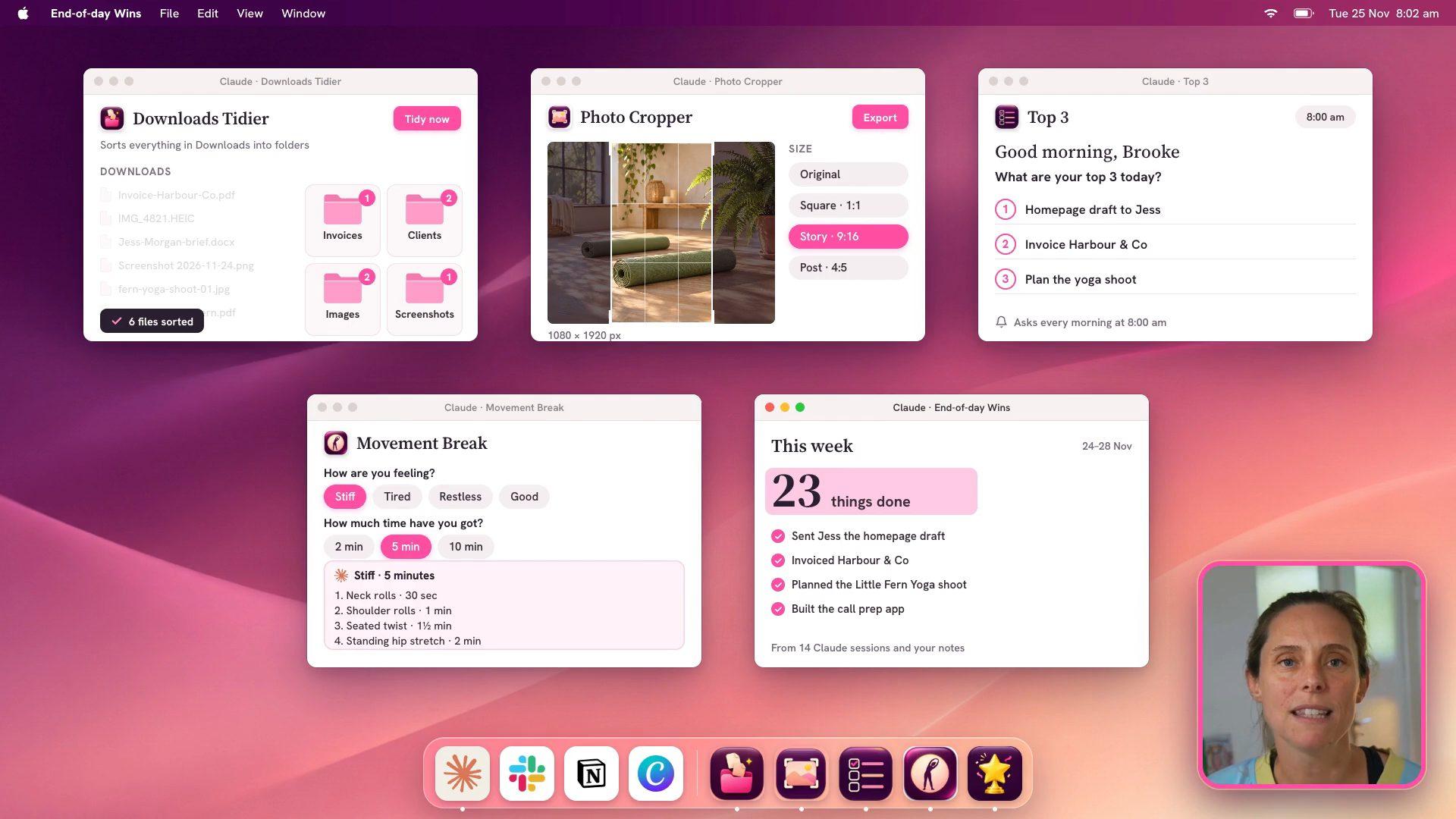
- a downloads folder tidier that sorts everything into folders
- a simple photo editor that crops to square or story size
- a to-do list that asks for your top 3 every morning
- a movement break where you tap how you're feeling and how much time you've got, and Claude gives you stretches to match
- an end-of-day wins app that asks what you got done and turns it into a little report, for the weeks where you feel like you've done nothing but you've actually done the most
Each of these used to be a separate app, a messy spreadsheet or nothing at all. Now each one is a prompt inside Claude.
How do you start? Try this prompt
Pick one thing you rebuild every week, or a little tool you're currently paying for, then tell Claude:
Turn this into an artefact I can use every week. Make it easy to update, and show me where every number comes from if you're pulling in data.
Try it, and if it earns its spot, install it as an app.
The difference between a meh artifact and one you actually open every day mostly comes down to how you brief it. Tell Claude who's going to use it, what decision it's helping you make (or what it's for), and what good looks like. Brief it the way you'd brief a real person you'd hired to build the tool.
One thing to watch: getting artifact-happy. If you've got 30 artifacts and you can't find the one you need, you've just made yourself a new kind of mess. The whole point is less overwhelm, not more tabs.
Are you locking yourself in?
It's a fair worry. Artifacts are stored on Anthropic's servers, and people need a Claude account to open the docs and sheets you share with them. Of course Anthropic wants your work to live in Claude. It's a very smart move.
But every artifact has an exit:
- Docs export to Word, PDF, Markdown or Google Docs.
- Slides go to PowerPoint, PDF or Google Slides.
- Sheets go to Excel or CSV.
- Designs export as HTML or PDF, among other formats.
My rule is simple. Keep the real stuff (your client info, your processes, your content) in places you own, and use artifacts as a window: for using, sharing and getting feedback, then export what you need. And you're not going to sell a product built as a Claude artifact. That needs to be deployed properly on the internet.
Why it's worth getting good at artifacts
Most people still ask Claude something, then do the last bit themselves. They copy the answer, paste it somewhere, format it and send it. With artifacts, the thing Claude makes is the thing you use, and Claude can keep working on it after you've shared it.
I think it matters for two reasons. First, small business owners and solo founders are going to want these tools, and if you can teach them to build ones that suit their business, that's your edge. Second, the habit carries over: briefing AI to build what you need, checking its work, and sharing something better than a file. That's a fundamental skill for building with AI, whatever tool you end up in.
Quick answers
Are Claude artifacts free?
Yes, with limits. Free gets Docs, Slides and Design, and can install an artifact as an app (in beta). Data, Sheets and Whiteboards, plus saving data and using connected apps inside an artifact, need Pro or above. Motion is Team and Enterprise only for now.
Do my clients need a Claude account to open an artifact?
Usually not, if you share it with "Anyone with the link". Docs and sheets are the exception: they have to sign in, and then they can only view. Either way, on Pro the parts that use Claude or your connected apps won't work for them.
Does an installed artifact app cost extra?
There's no API key and no separate fee. Building it, and every request it makes to Claude, counts toward your plan's usage limits.
Can I install an artifact as an app in the browser or on my phone?
No. It's the Claude desktop app on a Mac or Windows computer only, version 6.28899.0 or later.
Want help building yours?
Reading about a client tracker is one thing. Building yours, with your own clients and your own connected apps, is another. Inside Wright Mode, bring the little tool you keep rebuilding to the monthly Build with Brooke or fortnightly co-working and Q&A, and use my templates and trainings, including how to build tools that sit outside Claude when an artifact isn't enough.