To use Claude Code properly, stop treating Claude like a chat window and start handing it jobs. Open the Code tab in the Claude desktop app, give it one home folder for your business with a short CLAUDE.md file, ask for a plan before it builds, brief big jobs in six parts, turn anything that comes out right into a skill, then put the jobs you repeat on a schedule. You don't write a line of code for any of it.
If you're only using Claude to chat, you're missing most of what it can do. You ask, it answers, and then you do the actual work by copying and pasting the answer somewhere else. That's using Claude like a glorified Google.
I'm not a developer. I studied sociology and history and I've never written a line of code myself. My business makes over six figures a month, and most of it runs out of Claude Code now. These are the six things the women in my AI community who get great results all do, in the order I'd do them. Skip them and you'll spend more time fixing Claude's work than it saves you.
Every Claude screen in the video is a recreation Claude built in code. The two Pilates websites in step 4 are the real thing: Claude Code built them from two prompts, and I haven't touched them. Saltbush Pilates is a made-up studio. I checked the setup steps below against Anthropic's Claude Code docs on 21/11/2026.
The 6 steps at a glance
- Open the Code tab in the Claude desktop app, choose Local and pick a folder.
- Build your Claude HQ: one folder for your whole business, with a short CLAUDE.md that Claude writes by interviewing you.
- Ask for the plan first before Claude builds anything big.
- Brief it properly in six parts: the job, why it matters, what finished looks like, the rules, the proof and when to stop.
- Turn it into a skill once a job comes out right, so you never start from scratch again.
- Make it run without you with scheduled tasks.
1. Open the Code tab in the Claude desktop app
Claude Code is already inside the Claude desktop app, so there's nothing scary to install. Click Code at the top, choose Local (that means it works on your computer), pick a folder and you're in.
The difference from chat is that Claude Code does the actual job. It makes the files, builds the page, writes the post and saves it where it needs to go.
Don't let the word "code" put you off. You talk to it in plain English, the same way you'd explain a job to a new hire.
Two quick things before you start:
- It needs a paid plan. The free plan doesn't include Claude Code. Pro is US$20 a month (or US$17 a month if you pay yearly), plus any tax, according to Anthropic's pricing page on 21/11/2026. Through the App Store it's around A$30 a month.
- It works on Mac and Windows.
Hot tip for your first week: under the prompt box there's a mode menu with Manual, Accept edits, Plan and (on some accounts) Auto. Pick Manual. Claude shows you every change before it makes it, and you click to approve it. Once you trust it, you can loosen those permissions. (Fair warning: Claude asks permission a LOT, so you will get pretty sick of clicking approve, lol.)
2. Build your Claude HQ and let Claude interview you
The biggest complaint I hear is "Claude doesn't know me", or "I have to give it context every single time". It gets your voice wrong, forgets things about your business, and you end up explaining everything from scratch.
The fix is one folder for your whole business. I call mine my Claude HQ. Everything Claude does for me starts in there, so I don't have to remember which folder a job belongs in. It just works out of my HQ.
Then don't sit there writing a massive brief. Let Claude interview you instead. Open a session in your HQ folder and type:
Interview me about my business, one question at a time. Ask me about my customers, what I sell, how I sound and how I like to work, and then write it all into a CLAUDE.md file.
CLAUDE.md is just a plain text file. Claude reads it at the start of every chat in that folder, so it already knows who it's working for before you've typed a word.
Keep your CLAUDE.md short (mine is a map)
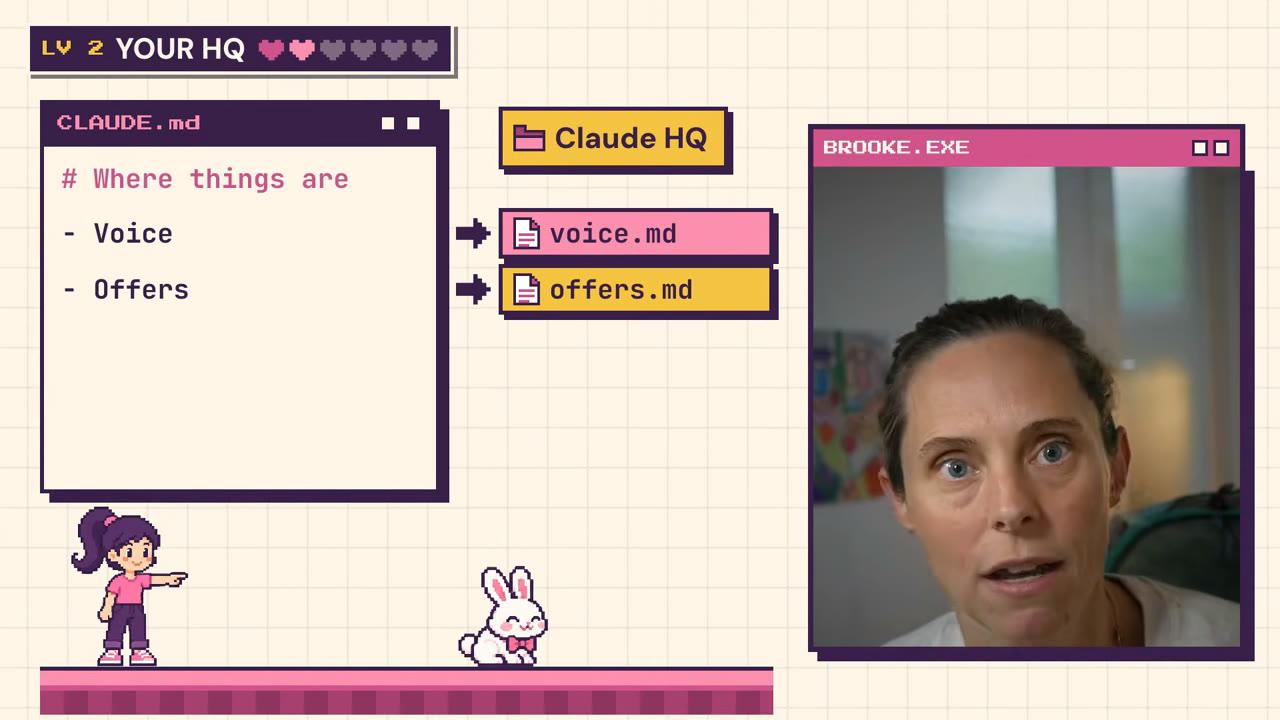
Here's where people go wrong: they cram everything into that one file. Keep it short. Mine is basically a map. It just says where things are: my voice is in this file, my offers are in that one, my audience is in another, and then it points to consultancy, membership and so on.
That way Claude only reads what it needs for the job, and the important stuff doesn't get buried. Anthropic's own CLAUDE.md guidance says the same thing: aim for under 200 lines, because longer files get followed less reliably. One small catch: if a file name in your map has an @ in front of it, Claude loads that whole file every time, which defeats the point of a map.
And you don't have to make those files yourself. Delegate it:
Go to my website, learn about my offers and prices, and then save them in my offers file.
Claude will go and get that information and file it for you.
3. Ask for the plan first
Make Claude plan before it builds. If it starts building straight away, you only find out it misunderstood the brief once it's finished.
In the same mode menu, pick Plan. Claude writes out exactly what it's going to do, step by step, and waits for your OK before it touches anything. You can also brain dump into a normal session and say "give me a plan before you go off and do anything".
It's like having a team meeting with a staff member. If a step's wrong, you say so now, before anything's built. I do this for anything that goes for more than a couple of steps, and it saves me time in the long run.
4. Brief it properly: the 6-part brief
This is the big one. Most people give Claude one or two lines, like "make me a website", and get back something they're not happy with. For any big job, switch to what I call outcome-based prompting and cover six things:
- The job: what you actually want. Describe the outcome, not the detail.
- Why it matters: so Claude knows the context and what's at stake.
- What finished looks like: the thing that should exist at the end.
- The rules: anything it has to follow, like your brand, your spelling and what it must never do.
- The proof: what Claude has to show to prove it's done and that it checked its work.
- When to stop: a limit, so it doesn't keep going forever.
The proof is what makes this work. "Make it good" means nothing to Claude. "Check it against this list, tick off everything, and if you can't, keep working" does.
One line vs six parts: two real websites
To show you the difference, I gave Claude Code the same job twice. The first prompt was one line:
Make a website for my Pilates studio.
The second was the six-part version:
The job: build me a one-page website for my Pilates studio. Let's call it Saltbush Pilates.
Why this matters: it's going to be in my Instagram bio so people can see classes and book.
What finished looks like: it's one page that works on mobile and desktop. It has our intro offer up the top, 3 class packs with prices, a book a class button, and a little bit about me in 2 lines.
The rules: use my brand colours, my fonts and my voice, and also get my branding photos.
The proof: check it against this list and show me the score. It loads on a phone, every button works, there are no spelling mistakes, it uses my brand colours, and it sounds like me.
When to stop: check it up to 3 times, and if you don't pass, still show me.
For the second run, the folder held a made-up brand kit (colours, fonts, voice rules, prices and three brand photos) and a short CLAUDE.md pointing to it. Here's what came back.
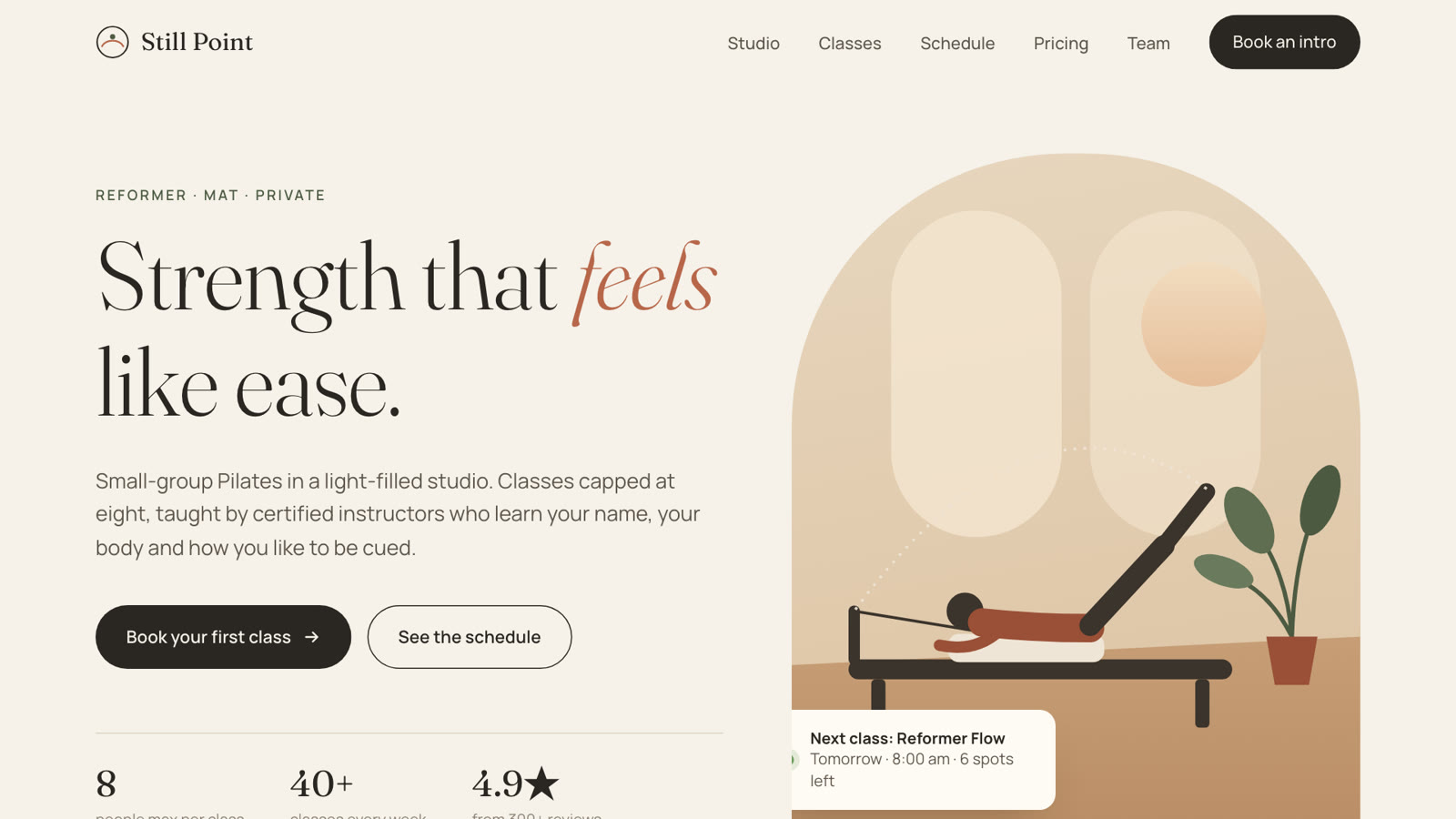
The one-line version, exactly as Claude Code built it.
Honestly? The one-liner came out looking polished. It's not an ugly page. But it isn't anybody. Claude invented the studio's name, an address, a phone number and "4.9★ from 300+ reviews", and the copy could sit on any studio's site in any city. To be fair, it did say every detail was a placeholder.
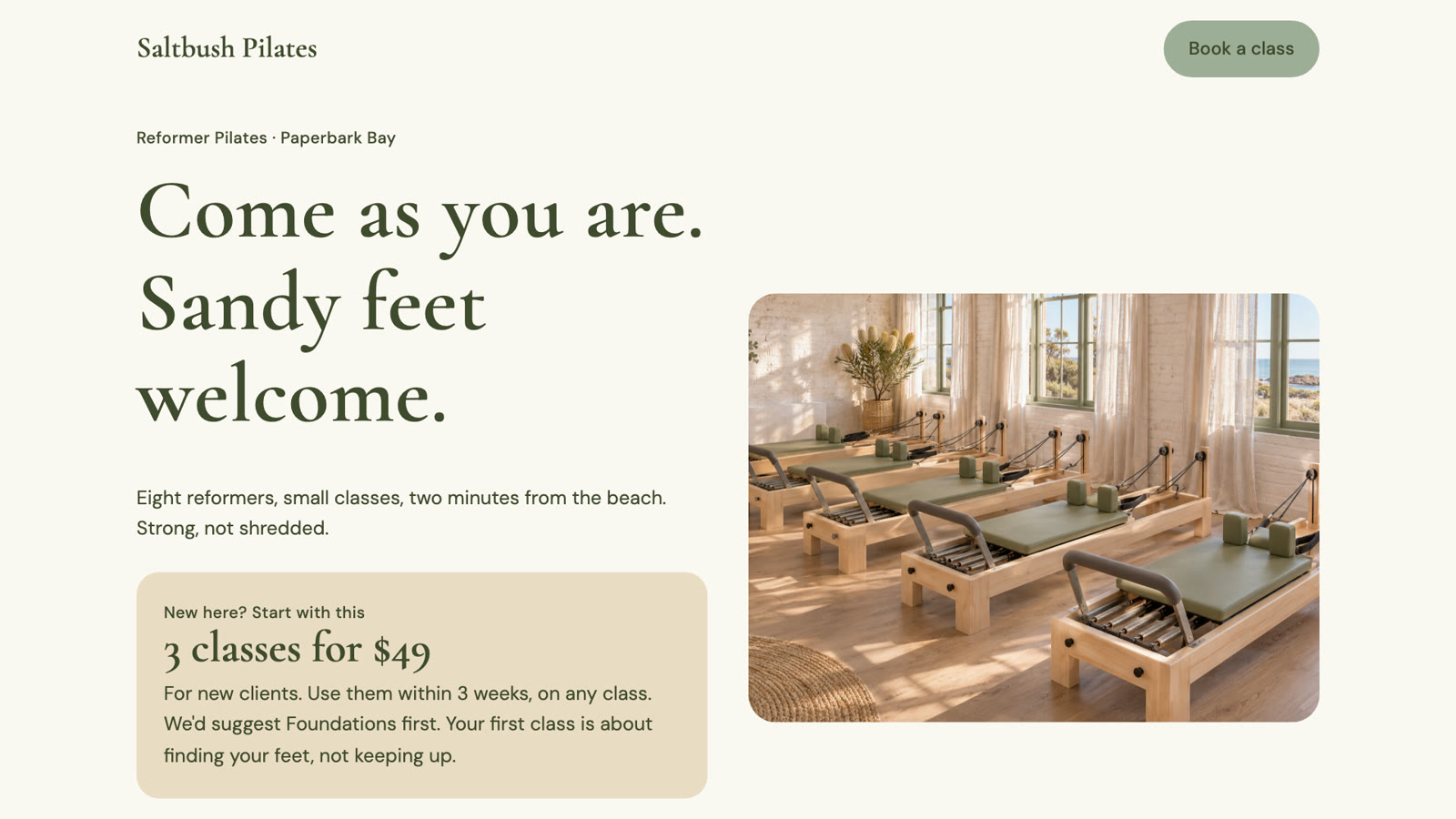
The six-part version. The studio, the prices and the photos are all made up for the test.
The six-part version is plainer, but every line on it is Saltbush. The $49 intro offer is the first thing you see. It has the three class packs with their prices, the founder's story word for word, only the brand colours and fonts, and all three brand photos. It used the brand colours because it read the brand guidelines, and it checked itself against my list before it showed me anything.
It scored itself 5/5. For this test I'd locked it down so it couldn't open a browser, so it did its check by reading its own code, and it told me so. When I opened the page, the first letter of one small label was clipped at the edge. Its check missed that. Which is exactly why "open it on a real phone" belongs in your proof list.
If you use Claude Code in VS Code, you can put /goal in front of a brief like this. Then a separate checker marks Claude's work before it's allowed to say it's done. I've built websites this way, gone out for dinner and come back to a finished site. (I break down how goals, loops and scheduled jobs differ in another post.)
I've put the 6-part template and my copy-and-paste examples in my free Hands-Off Claude Kit.
5. Turn what works into a skill
Once a job comes out right, you never want to start from scratch again. Think about the jobs you do the same way every week. Is it your content planning? Replying to enquiries? Turning a reel into a carousel?
When Claude finally nails one of those, stay in that chat and type:
Okay, turn what we just did into a skill and use the learnings from above so that you know how to do this job well.
Claude writes the skill for you, with all the steps and all the gotchas you hit along the way. Then start a new chat, type /, and your skill is sitting in the list. It's your own little command.
Here's one of mine. I give it one of my reels, and it works out what I said from the transcript, plans the slides, builds a carousel in my brand and publishes it to Instagram using a tool called Blotato. (The bigger version of that system is in how I repurpose one video into social posts.)
The best part is what happens when it gets something wrong. Give it the feedback like you would a real staff member, then say "update the skill so you remember that". You only do that once and it's saved.
Once you've got a few skills, you can chain them into a skill system that runs a whole job end to end.
6. Make it run without you with scheduled tasks
It shouldn't always be up to you to prompt Claude. Scheduled tasks run a job on a timetable, and here's how to set one up in the desktop app:
- In the Code tab, open the Scheduled page and click New task.
- Give it a name and paste in the instruction: what Claude should do each time it runs.
- Under Advanced settings, turn on Only on this computer and pick your HQ folder, so the task can get to your files.
- Set the schedule, like every Monday at 8am.
- Click Create.
If your app says Routines instead of Scheduled, that's the same page under its earlier name, so click New routine instead. The form also looks a little different between app versions, and Anthropic's scheduled tasks guide covers each one.
The easier way, and the one I'd recommend, is to go back into a chat and ask for it. Something like:
Let's set up a scheduled task that runs at Monday 8am, and you're going to check all of my SEO stats for me.
Claude builds its own workflow for the task, and it can call your skills too, which is really cool.
Add guardrails while you're there:
- "Never send, draft only" for anything that writes emails for you.
- "Tell me when nothing happens", so you know the work is still getting done and the task hasn't failed.
Two gotchas that catch everyone
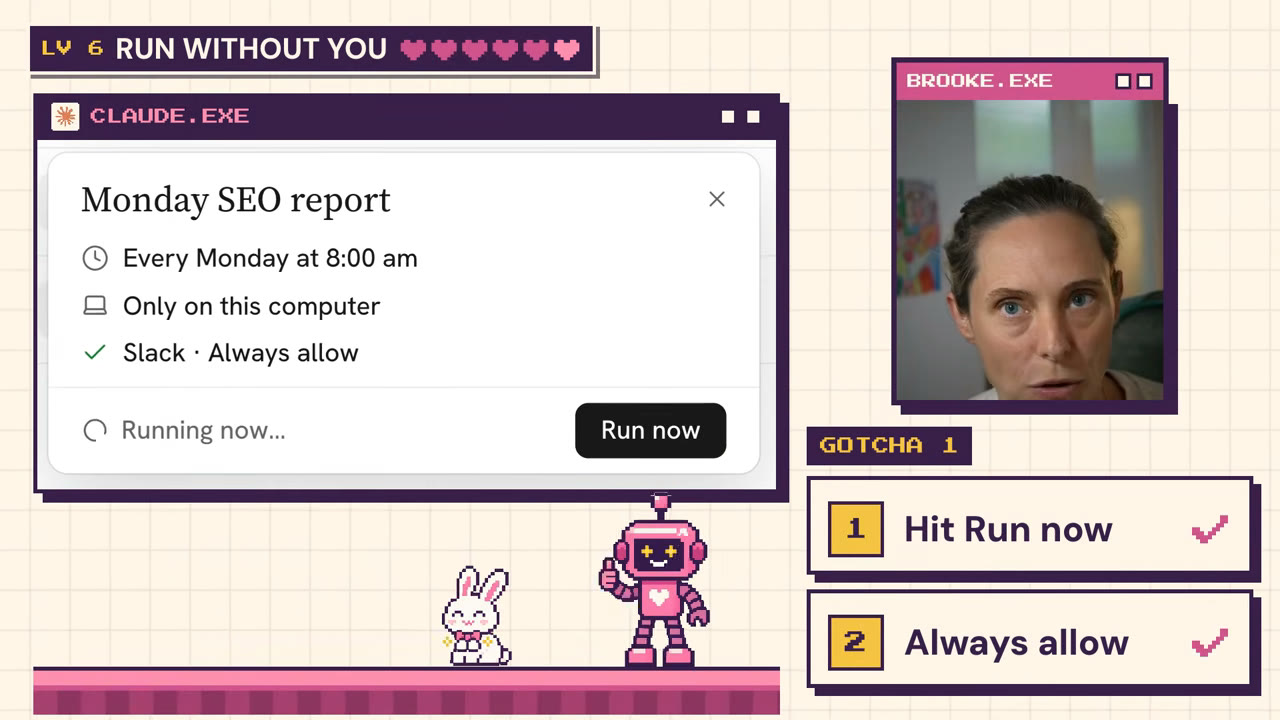
A frame from the video. The task card is recreated in code.
Hit Run now once. After you save the task, click Run now and choose Always allow when it asks for permission. Otherwise your Monday run can get stuck waiting for you to say yes. If the job edits files, also set the task's own permission mode to Accept edits, because an always-allow on a file edit only covers that one run.
Your computer has to be awake with the app open. If it's asleep at 8am, or you're travelling, the run gets skipped. It catches up once when you open your laptop again, so it won't fire six times in a row after a week away.
That's exactly how my Monday SEO report runs. It turns up in Slack before I've had my coffee.
Where to start this week
You don't have to do all six things today. Start here:
- Open the Code tab in your Claude desktop app and pick a folder for your business.
- Set up your HQ and let Claude interview you into a CLAUDE.md.
- Brief one real job in six parts, in Plan mode.
Everything else gets easier once Claude knows your business. Then turn what works into skills, standardise how the work gets done, and put the repeat jobs on a schedule.
Want to see a real build? One of my members built a tool with Claude, and it brought in a reported $1,700 in its first 18 hours. Here's how she built and launched it.
If you want me to walk you through all six steps with other women doing it alongside you, that's what my AI community is for. You get my courses, templates and skills to set you up properly, and I'm in there every day answering questions. Join the Wright Mode membership.
FAQ
Do I need to know how to code to use Claude Code?
No. You talk to Claude Code in plain English, the way you'd brief a new team member. I've never written a line of code myself. The skill that matters is describing what "finished" looks like and how Claude should prove it got there.
What's the difference between Claude chat and Claude Code?
Chat answers your question, and then you do the work. Claude Code does the work on your computer: it makes the files, builds the page and saves it in your folder. Both are in the same desktop app. Claude Code is the Code tab.
Do Claude scheduled tasks run when my computer is off?
No, not the local ones. A task set to Only on this computer needs your computer awake and the Claude app open, and it does one catch-up run when you're back. Anthropic also has cloud scheduled tasks that run with your laptop closed, but they can't reach the files on your computer.