To edit reels with Claude you need three things: Claude Code or Codex, HyperFrames (a free, open-source tool from HeyGen) and a reel whose editing you love. Claude breaks that reel down frame by frame, you film your own take, then you ask for the style and the effects in plain English. You don't need editing skills. You do need to tell Claude what good looks like.
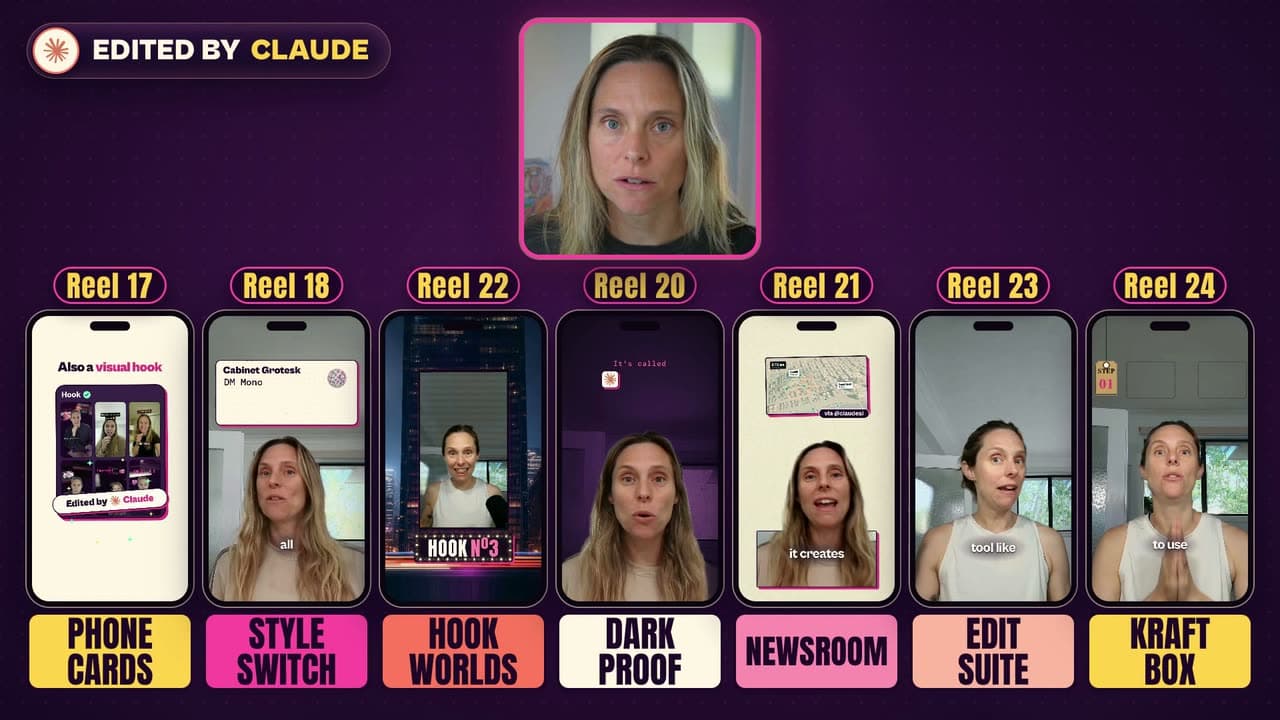
Claude edited every reel in this post. Seven are styles I've already posted. The other five I built for this video, on my own footage. They look completely different, and they all started the same way: me in my office, talking to camera.
What you need to edit reels with Claude
- Claude Code or Codex. I've tested this in both. Right now I'm really liking Opus 5.5, because I think it does a better job of editing. That's my experience, not a benchmark.
- HyperFrames, which is free.
- A reel you love the look of. You're copying how it's edited, not what it's about.
HyperFrames is an open-source tool from HeyGen. Claude builds each graphic like a little web page, and HyperFrames turns it into an actual video. That's what makes all of this possible: the text flying in, the cards behind my head, even the old TV. It's also on my list of GitHub repos for Claude Code I actually use, if you want the rest of my setup.
How to install HyperFrames in Claude Code or Codex
Before you install it, your computer needs two things: Node version 22 or newer and FFmpeg. You don't need to know what those are. Open Claude Code, ask it whether they're installed, and get it to install them if they're not.
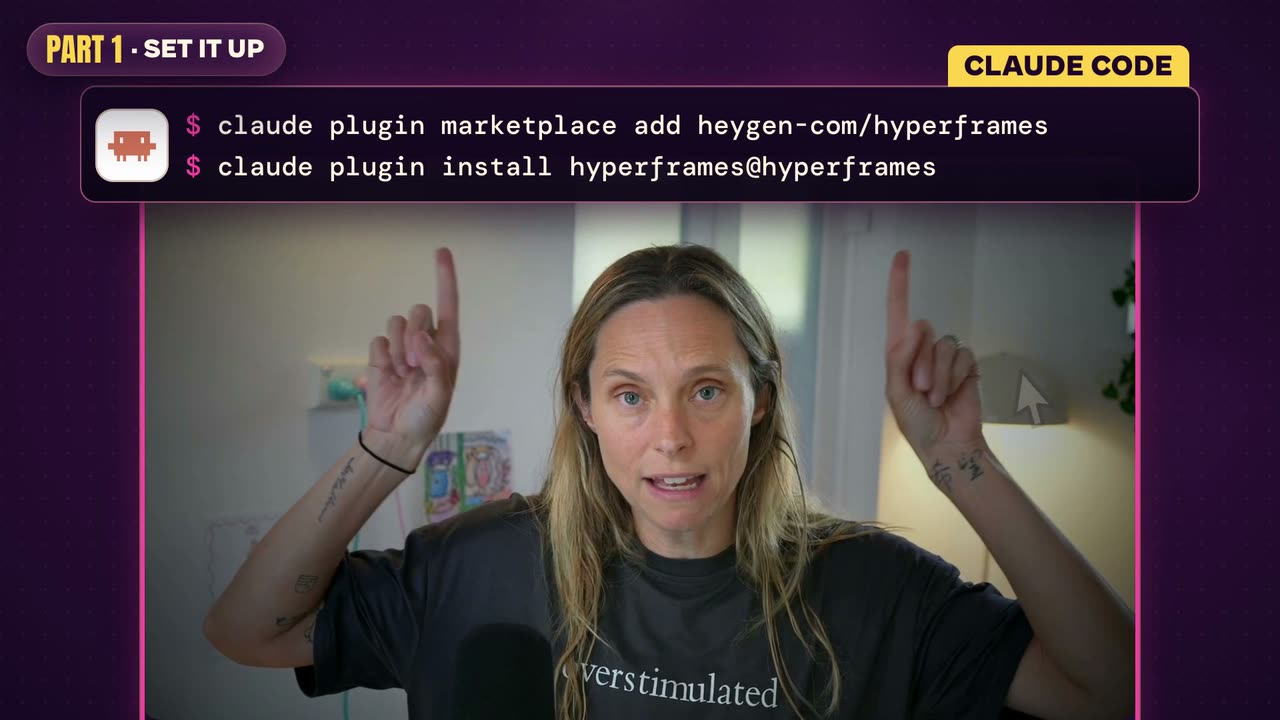
In Claude Code, it's these two lines:
claude plugin marketplace add heygen-com/hyperframes
claude plugin install hyperframes@hyperframes
In Codex, it's one line:
npx skills add heygen-com/hyperframes
If a picker pops up asking which skills you want, the HyperFrames readme says the Core Skills group is all you need.
Then run this. It checks you've got everything you need:
npx hyperframes doctor
Or the easy way, which is honestly what I'd do. Paste the link to the HyperFrames GitHub page into Claude Code and say:
Install this and check your work. Make sure it works.
I checked these commands and the Node 22 and FFmpeg requirements against the HyperFrames readme on 19/10/2026. If the readme says something different by the time you read this, go with the readme. Brand new to Claude Code? Start with Claude Code for non-technical users.
Be the creative director (the step most people skip)
This is why so many AI edits look the same, or just average. If you just say "edit this video", Claude will give you something super basic. Claude doesn't know what good looks like.
You need to be the creative director. You can do that without any video editing skills, but you do need to describe what good looks like for you. The quickest way I've found is to show Claude a reel you love and let it work out what makes it good.
I made a separate video on how my editing skill works behind the scenes: Opus 5.5 Edited My Reel. This is WILD!
How to break down a reel you love
- Save it. When I see a reel and I really like the edits, I save it.
- Paste the link into Claude. Ask it to break the reel down frame by frame.
- Let it build the context. Claude downloads the reel and makes a contact sheet, which is just a frame laid out every half second. It pulls the transcript too. That's how the model understands what's actually happening on screen: where the text comes in, whether GIFs come in, all of it.
- Film your own take. Then tell Claude what you want, in plain English.
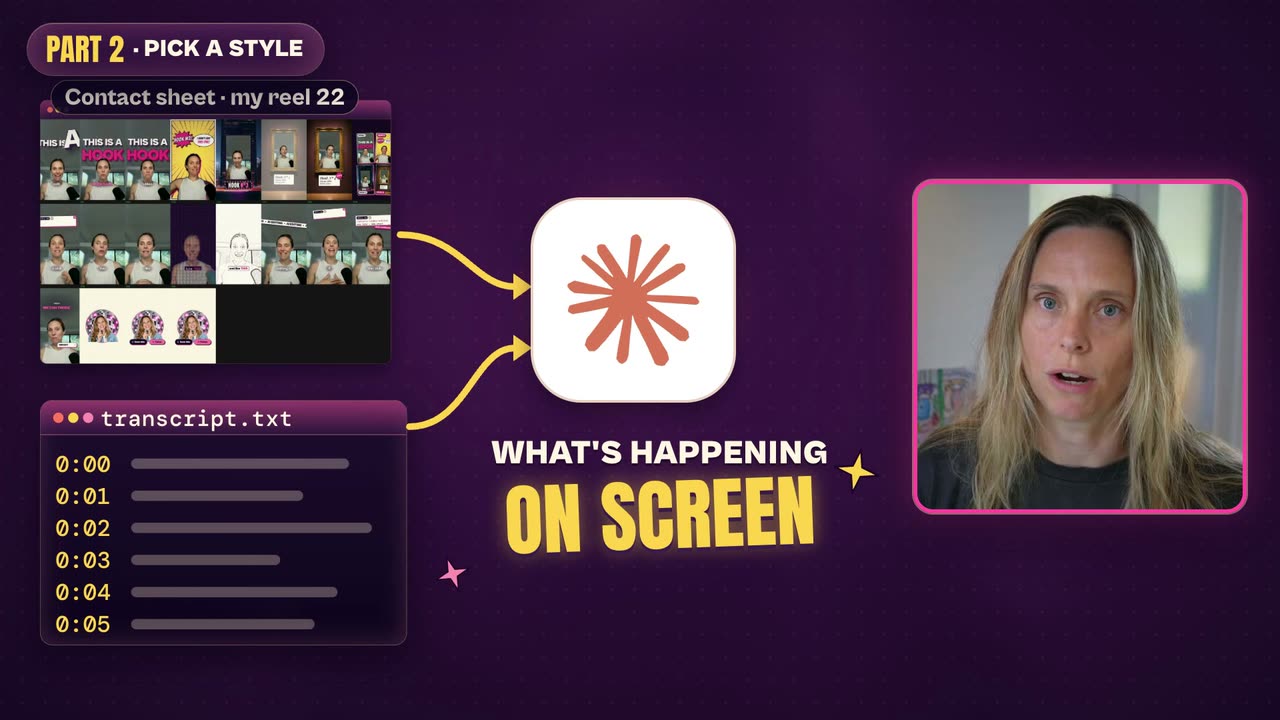
One heads-up: Instagram often won't let Claude in. If it comes back empty-handed, download the reel yourself and give Claude the file instead.
The asks I actually type look like this:
Give me a fan of GIFs above my head.
Make my reels twirl around my head like a cylinder.
One rule: copy the format, not the look
You can copy the format of a reel you love and its editing style. Then put your own flavour on it: your brand colours, and the images and GIFs you like. Take the time to set this up properly so it feels like you.
The 12 reel styles Claude edited (and when to use each)
Styles 1 to 7 are ones I've posted. Styles 8 to 12 are the five new ones.
| Style | What happens on screen | Use it for |
|---|---|---|
| 1. Phone cards | My old reels and YouTube thumbnails float around my head like phone screens, then the raw take plays next to Claude's edit | Proof: a before and after, or a body of work you want to highlight |
| 2. Style switch | The same take with three different skins in about six seconds: a pink frame, a cinema letterbox and an old TV | Showing range, and testing which look your audience likes |
| 3. Hook worlds | Every time I say "this is a hook", I get dropped into a new scene, or the words appear behind my head | Hooking viewers in |
| 4. Dark proof | My room goes moody purple and real launch footage plays inside a TV | Explaining something new where you need to show the real product |
| 5. Newsroom | A newspaper front page, a breaking headline and a rubber stamp | News and launches |
| 6. Edit suite | It opens inside an editing app, a clapperboard calls out each step, and the install commands type out in a terminal | Tutorials with steps |
| 7. Kraft box | A cardboard box bursts open with my tools inside, every step sits on a little hang tag, and at the end it all gets packaged up into a skill | "Here's my setup" reels |
| 8. Home video | A camcorder overlay with the battery and the date in the corner, plus film grain and a handheld shake | Storytime and behind the scenes |
| 9. Scrapbook | Torn paper scraps flutter away to reveal me, each new point rips in like a page being torn, titles write themselves out like handwriting, and arrows and circles get scribbled on | Opinions and lessons learned |
| 10. Notification storm | Tabs, tasks and pings rush in around me while I stay still in the middle, then one calm notification pops up with the fix | "This used to be chaos, here's the fix" |
| 11. Comment reply | A real comment types itself onto the screen, then a Claude-style chat types out the question and streams the answer | Answering the questions people are asking you |
| 12. Whiteboard | A sketch draws itself beside me one stroke at a time and keywords get circled, kind of like a Vox explainer | Explaining how something works |
Turn the styles you like into a skill
You don't have to rebuild a style every time. In the video I suggest dropping the video itself into Claude, getting it to grab the transcript, and asking it to create a HyperFrames skill based on these styles. Then keep adding to it:
- Visual hooks: pick a couple you like and put them in your skill, and Claude will draw on those each time.
- Looks your audience likes: test a few (that's what the style switch is great for), then put the winners into the skill.
- Your colours: any of these can be recoloured. Dark proof doesn't have to be purple.
If you've never chained skills together before, here's how I build Claude skill systems.
The HyperFrames effects you can ask Claude for by name
Every one of those styles is built from smaller pieces. HyperFrames has over 400 elements (447 blocks and components in its registry when I checked on 19/10/2026), and if you know what they're called, you can ask Claude to add them in. Home video, for example, is five of them stacked together.
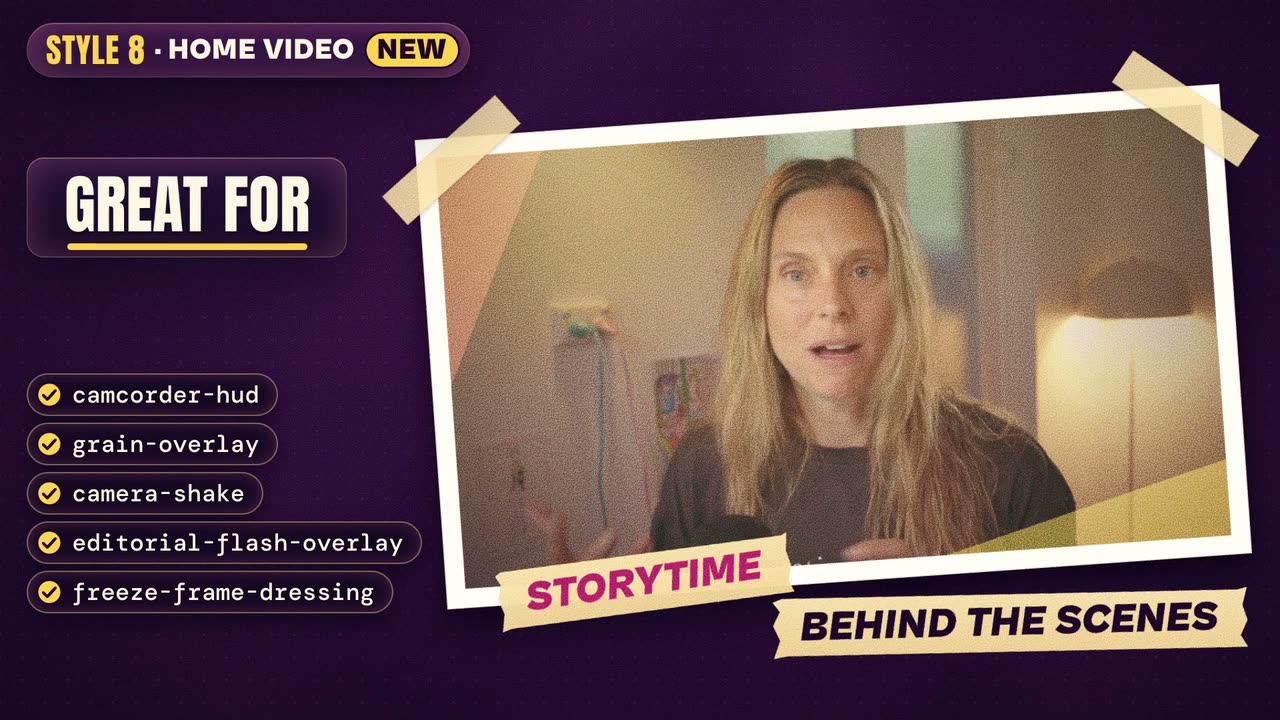
These are the ones I'd use on a talking-head reel. Screenshot the names.
Captions and text
caption-pill-karaoke: each word lights up inside a rounded pill as you say it.caption-kinetic-slam: one huge word on screen, flying in from alternating sides. Great for your first two seconds as a visual hook, and for retention.marker-highlight: a hand-drawn marker stroke lands on the word you want to stand out.strikethrough-replace: crosses out the old text and reveals the new. Great for "stop doing this, do this instead".typed-prompt: a prompt types itself out with a blinking cursor, and it can even backspace and fix a word, so it looks like natural typing. Great for AI prompts.scramble-reveal: the letters cycle like a hacker screen, then lock in from left to right.
Proof
yt-comment-card: a comment types itself over your real footage, with the avatar and likes.x-postandreddit-post: post cards for X and Reddit.claude-exchangeandchatgpt-exchange: Claude and ChatGPT chat boxes that type for you. If you do any kind of AI education, you don't need to screen-record anything now.before-after-wipe: a divider slides across and wipes the after over the before.count-up: a number counts up and lands with a little pulse. Real numbers only, please.notification-cascade: phone notifications land one after another and stack up the screen.hw-arrow,hw-callout-circleandhw-underline: hand-drawn arrows, circles and squiggly lines that draw themselves on.
Transitions
whip-pan,light-leakandglitch: the cinematic ones. HyperFrames' own advice is to pick two per video at most, and I agree. We don't want to be overkilling and over-engineering this stuff.torn-paper-rip: the frame tears across and lifts away to show the next scene.halftone-dissolve: little dots pop on and open up into the next scene.
Overlays
camcorder-hud: the record dot, the battery and the date.telemetry-hud: corner brackets and little readouts ticking away. Very mission control.instagram-followandtiktok-follow: follow cards.yt-lower-third: a YouTube subscribe bar for the end.
You don't need to remember any of this. You just need to know these exist so you can ask for them, and then package your favourites into a skill. Or, once you've picked a reel you like, ask Claude:
Which elements would match this reel?
And let it pick. If you'd rather add one yourself, the readme's command is npx hyperframes add followed by the element's name, and you can browse every block and component on the HyperFrames website.
It won't be perfect first go
I want to be really clear about this one. These don't come out perfect first go. Most of my reels took 2 to 4 goes to start with.
So build a storyboard step into your skill. Claude lays out what it thinks should be in the reel before it animates anything, so you get the vibe before it spends time rendering. You say "I like this, I don't like this, change this", and then it makes the video. Much better than waiting for the whole render, watching it back and going, this was rubbish.
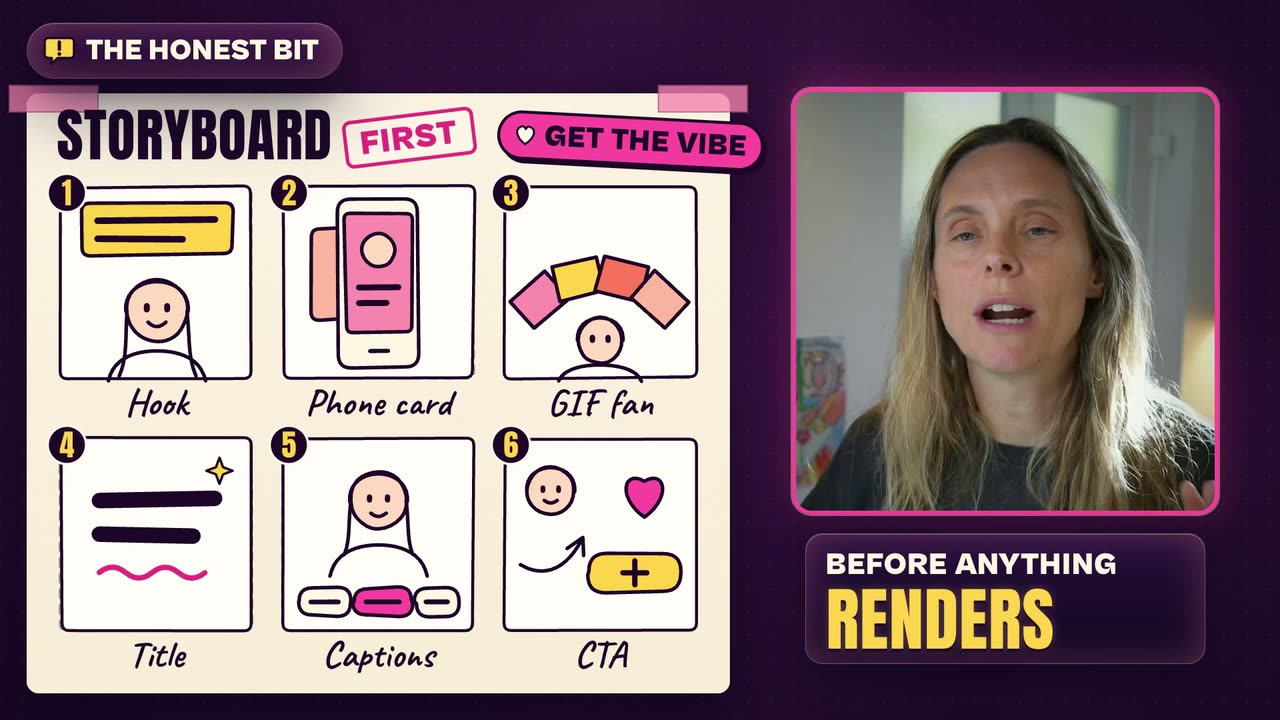
Two more things worth knowing:
- Claude doesn't make the images. Some props in the video, like the old TV and the rubber stamp, came from ChatGPT's image generator. Claude can't generate those images, but it will animate them. So Claude makes the editing decisions and builds the graphics, and it pulls in an image model for some of the props. For my newsroom reel, the images came from ChatGPT, and I told Claude to turn them into stickers and use them in the reel.
- Watch every one before you post. I check that the hook is where it needs to be, nothing weird is going on, and it actually looks good.
FAQ
Do I need video editing skills to edit reels with Claude?
No. You need to be the creative director: show Claude a reel you love and describe what good looks like for you. If you just say "edit this video", you'll get something basic.
Is HyperFrames free?
Yes. HyperFrames is open source from HeyGen, released under the Apache 2.0 licence (checked 19/10/2026). You still need Claude Code or Codex to drive it, and that's a separate plan.
Should I use Claude Code or Codex for video editing?
HyperFrames works in both, and I've tested both. Right now I prefer Opus 5.5 in Claude Code because I think it does a better job of editing. Try your reference reel in whichever one you already pay for.
Can Claude generate the images in my reels?
Not by itself. Props in my reels, like the old TV and the rubber stamp, came from ChatGPT's image generator. Claude animated them, made the editing decisions and built the graphics.
How long does it take to get a reel right?
Most of my reels took 2 to 4 goes to start with. A storyboard-first step cuts down the renders you throw away.
The shortcut: my Short Editor skill
If you'd rather not build this from scratch, my Short Editor skill is inside Wright Mode, my AI community for women, along with the Reel Elements add-on in the classroom. It asks about your brand colours and the type of videos you want to make. You give it 2 to 5 reels you love, and it creates your style for you with the elements built in. You get your own style, not a copy of my pink one. It's Mac only for now.