ChatGPT Dots, Grok Bot and Meta Muse are managed AI agents. Each one comes with its own computer in the cloud, connects to your tools in a few clicks and keeps working after you shut your laptop. Hermes is the build-your-own option: free, open-source software where you choose the model, the tools and where it runs. Claude Code and Codex are the same idea, built to work in your files and folders.
The short version of which one to pick:
- Already paying for ChatGPT Pro? Start with Dots.
- Want a team of bots that report to a manager bot? Grok Bot.
- Want to pick every part yourself, and API keys don't scare you? Hermes.
- Working in a folder of business files, or building a website? Claude Code or Codex.
OpenAI announced Dots on 29/09/2026 and now everyone's asking which of these agents they actually need. I've been testing them (Muse on early access for the last few weeks), so this is the plain-English version. You don't need a computer science degree for any of it.
The quick comparison
| Agent | Where its computer lives | Setting it up | Entry price (US$, checked 02/10/2026) | Pick it if |
|---|---|---|---|---|
| ChatGPT Dots | Its own cloud computer. You can also give it access to your computer. | Create your dot on desktop, connect tools in a few clicks | ChatGPT Pro, from $100/month (also on the $200 and $500 Pro plans) | You already pay for ChatGPT Pro |
| Grok Bot | One cloud computer your bots share | Sign in (mine goes through Cursor), connect tools, build bots | Cursor Pro $20/month, or a SuperGrok plan from $30/month | You want several bots and a manager bot |
| Meta Muse | A cloud computer | Your Meta account, then the apps you use | Free plan, then $20 or $100/month | You live in Instagram, Facebook and WhatsApp (US and Canada listed so far) |
| Claude Code | Your computer, or a cloud environment | Point it at a folder; it asks before taking actions you haven't approved | Claude plan from $20/month; Max from $100/month | You're working in business files, websites or software |
| Codex | Your computer, or a cloud environment | Same as Claude Code, inside OpenAI's world | Included with ChatGPT Plus ($20/month); limited access on Free and Go | Same as Claude Code, and you already use ChatGPT |
| Hermes | Your computer, or a server you rent (a VPS) | You pick the model and tools, and where it's hosted. Expect MCPs, docs and API keys. | Software is free. You pay for the model, plus hosting if it runs 24/7. | You want control and you'll manage the setup |
Prices are advertised US dollar web prices I checked on 02/10/2026. They change fast, and every one of these plans has usage limits.
What is ChatGPT Dots?
ChatGPT Dots is OpenAI's personal AI agent: one ongoing assistant (your "dot") that lives inside ChatGPT and has its own cloud computer and browser. You can reach it from your phone or the desktop app, but you create it on desktop first.
OpenAI have made setup really easy. You give your dot an icon (I went with a cute little green pet), connect Slack, turn on desktop notifications, and choose whether it can use your computer as well as its own. The panel shows its recent activity, plus an outputs area where the documents, PDFs, slides and images it makes will sit.
Then you give it some responsibility. My test job was: find three workshop venues in Perth, make a table with sources, and draft an enquiry for me to review. No contacting venues. No booking anything.
That last line matters. These agents have their own browser, and they can go out and engage with things like customer support chats. Give them constraints.
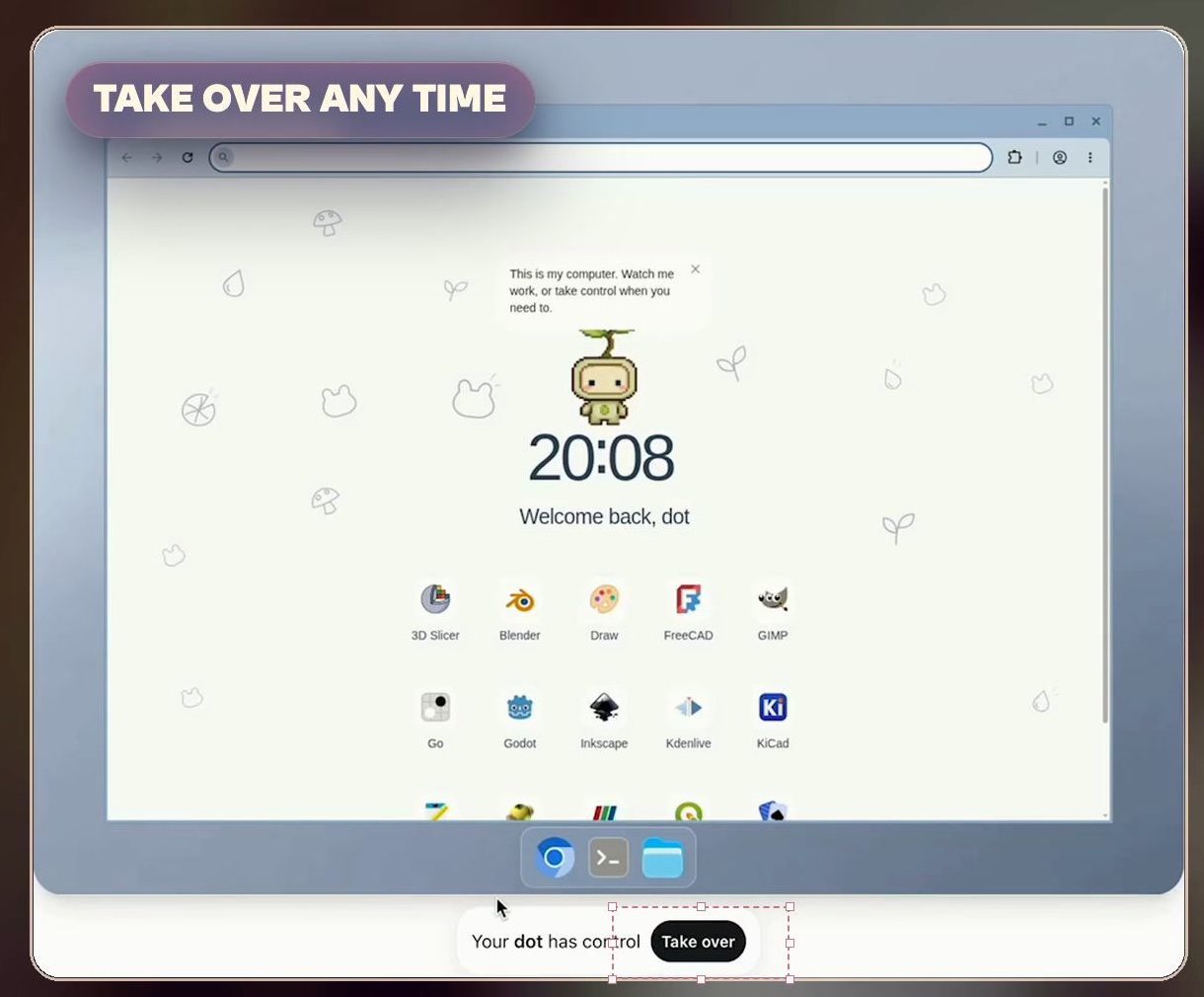
Open the side panel and you can watch its computer in real time. At any point you can take over and steer it somewhere else.
The real power is schedules. Say I didn't want to book a venue until three weeks out, once I knew people were confirmed. I could have the dot check those sources again tomorrow and tell me what changed. Same for watching flight prices.
Two more things I rate. It sits inside the ChatGPT ecosystem, where a lot of people already work. And your dot can hand work to Codex, so think of the dot coordinating a job and bringing in Codex when it needs coding done.
ChatGPT Dots vs Grok Bot: one thread or a team
The biggest difference I've found between Dots and Grok Bot is structure.
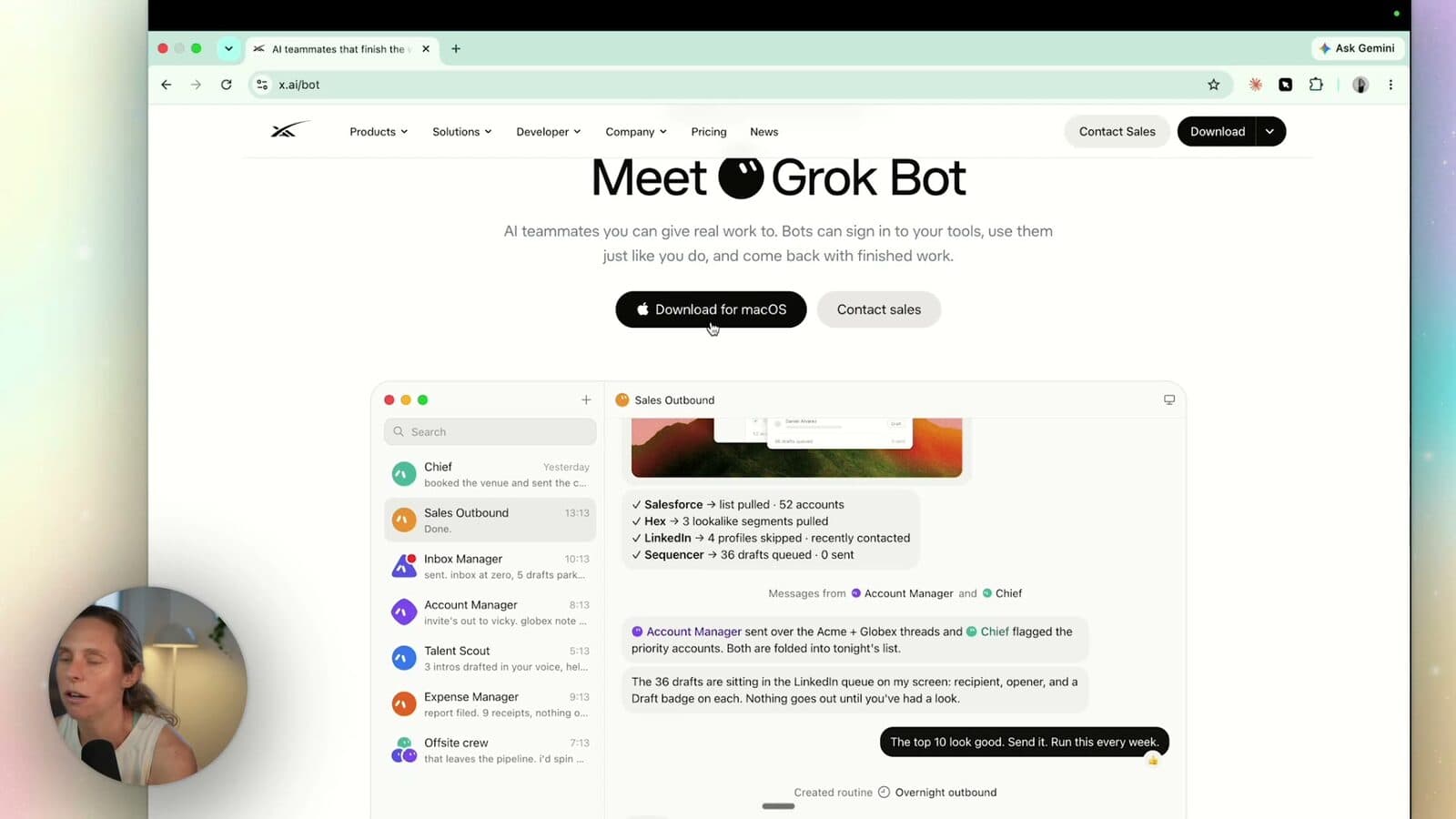
In Grok Bot you can have multiple bots, and they can chat to each other. I have a middle manager (my Chief of Staff bot) that reports back to me on what my other bots have done. With Dots you get one big long thread. Honestly? That isn't great.
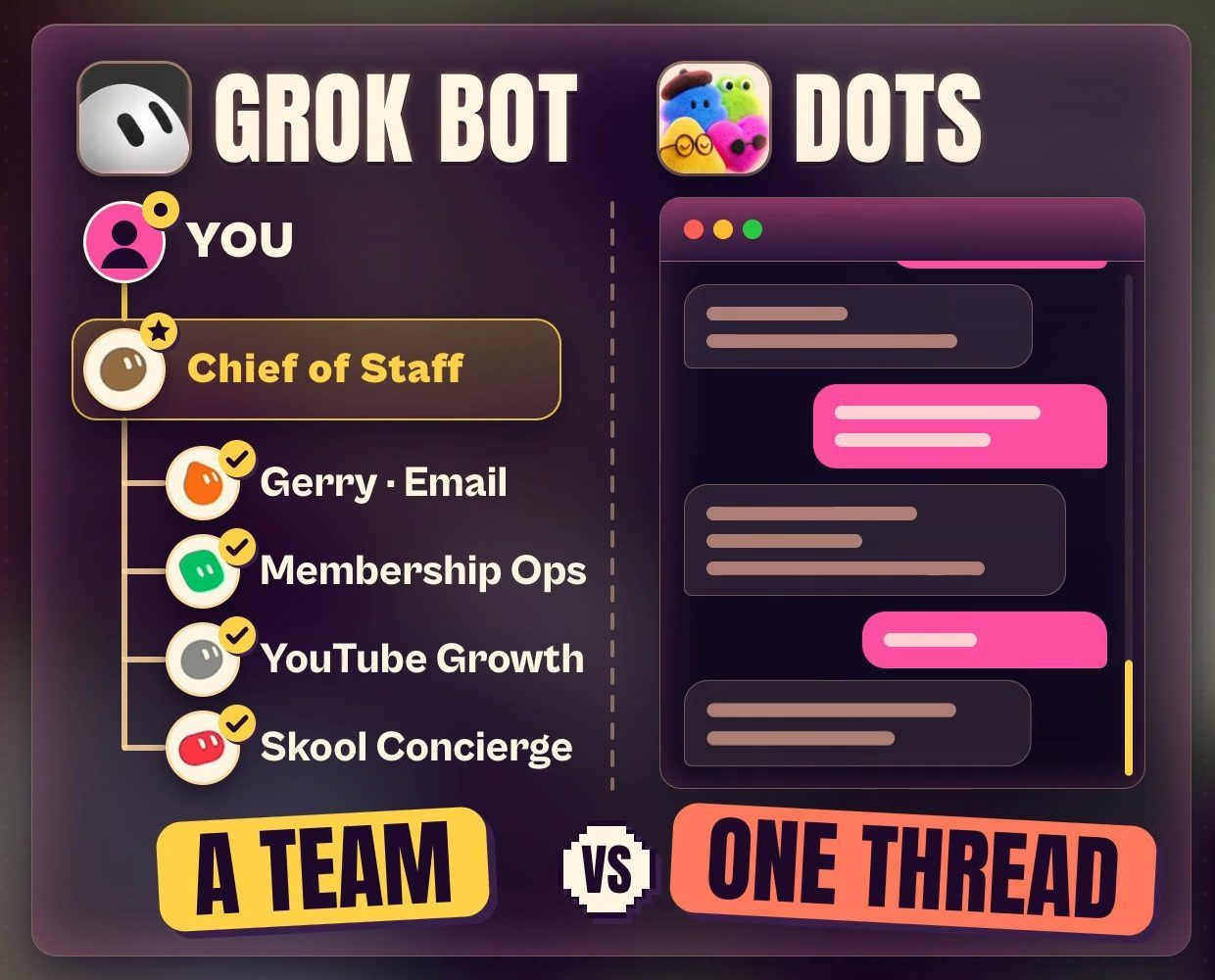
Grok Bot is also a different product from chatting with Grok. For my setup, I sign in through Cursor. Like Dots, you can open a bot and watch what it's doing in its own browser, and that browser lives in the cloud, which is how it stays on 24/7.
My full walkthrough, from connectors to the bot team to routines, is in the Grok Bot setup guide.
What is Meta Muse?
Muse is Meta's personal AI agent. Muse is the product (the harness) and Muse Spark is the model (the brain).
Meta's latest announcement lists access in the US and Canada. I've had early access and I've been testing it for the last few weeks. If you're in Australia, check availability, because you may not have it yet.
You connect Muse with your Meta account, then add the apps and services you use. The biggest drawcard is everything Meta already owns: Instagram, Facebook and WhatsApp are really easy to connect. Muse went to number one trending on the App Store, and I think that data is why.
What's actually inside an AI assistant?
Every AI assistant you'll use has four parts:
- The brain. That's the large language model (LLM). It works out what the next step is.
- The harness. The toolbelt and the rules: tools like Gmail, Notion and Slack, its memory, and the permissions that decide how the model is allowed to use those tools. Claude Code is a harness around a model. So are Codex, Grok Bot and Dots.
- The computer. The workspace where the action runs. With Muse, Grok Bot and Dots, that computer lives in the cloud instead of being tied to yours.
- The interface. Where you talk to it: an app like ChatGPT, a chat, or a terminal for things like Claude Code and Codex.
Same brain, different toolbelt: why the harness matters
The harness shapes what an agent can do and how it behaves. Pretend the brain is ChatGPT.
No tools: it can respond, and that's it. That's ChatGPT circa 2023.
Tools: now it can choose a step, use a tool and check the result. Is that done? Yes? Hand it over to me to review.
Memory: in Dots, it's unclear where that memory is stored. Muse gives you more oversight. It has its soul.md and memory, so you can see what it's saving.
Schedules: this is what makes these bots feel proactive. Under the hood it's a scheduled task running on a timer, and you can set those up in Claude Code and Codex too.
The approval gate: is it allowed to book things? Send emails on your behalf? Claude Code and Codex are permission-based. They'll draft that email and wait, unless you've specifically approved that action. Grok Bot, Muse and now Dots have much looser approvals. That's why they feel super proactive: fewer gates, so it feels like they're doing more for you.
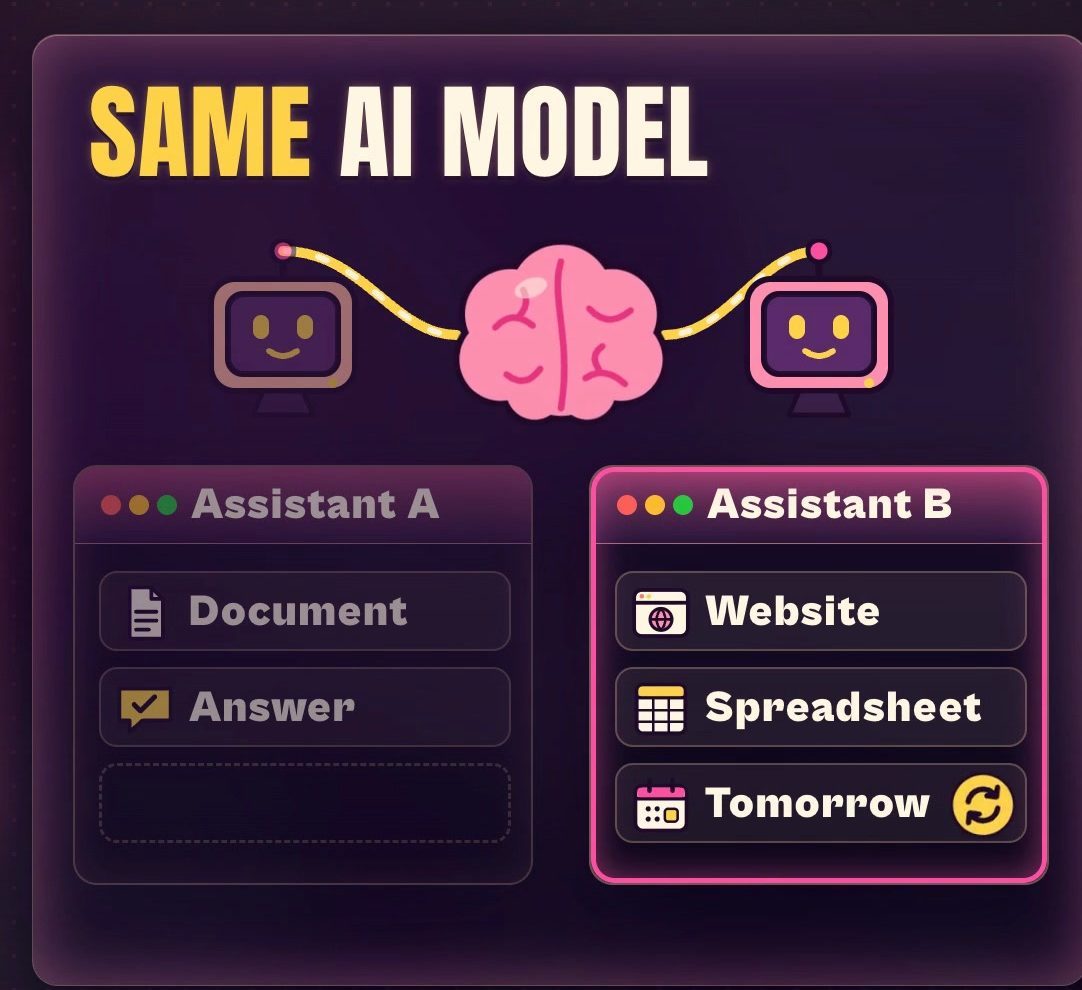
Here's why that matters. Picture two assistants using the same AI model. One can read a document and give you an answer. The other can open a website, save a spreadsheet and come back tomorrow to check for changes. We haven't changed the brain. We've changed what surrounds it. Does it have a browser? Does it keep notes? Can it wake up later? What happens when a step needs your approval?
That changes the experience massively. But the harness doesn't control every decision perfectly. The model matters, your instructions matter, and so do the tools, the information and the permissions you give it. A tool with permission to read your emails is very different from a tool with permission to send them.
And memory usually means keeping information for later. It doesn't automatically mean the AI brain is being retrained every time you chat. It just refers back to its notes.
Where is the agent's computer?
These new agents have their computer in the cloud. The cloud just means computers running somewhere else, on a server, reached over the internet. With a managed assistant, the company gives the agent a remote workplace.
That's how my dot runs 24/7. I can close my laptop and the cloud work continues. It's the same as choosing cloud instead of local when you run a task in Codex.
Two catches:
- Your laptop still matters for local jobs. If the task needs a file or app on your laptop, that part still needs your laptop online.
- The agent's browser has its own login. Being signed into Gmail on your laptop doesn't sign in the agent's separate browser. You connect the service and complete the sign-in inside its browser, and then it can do those things in Gmail for you.
Where Claude Code, Codex and Hermes fit
Claude Code is a harness too. Claude is the model family (Opus, Sonnet and Fable at the time I filmed this). Claude Code is software that gives those models tools and a way to work with your files and folders, so it can read files, edit files, run commands on your computer and check the result. The name says code, but you can do a whole bunch of other stuff without being a coder. If that's you, start with Claude Code for non-technical users.
Codex is OpenAI's equivalent. ChatGPT is the brain, and Codex wraps that model with tools, instructions and permissions. (I built a five-page website with it from a brief, which you can follow in How to build a website with ChatGPT Codex.) Both Claude Code and Codex can work locally or in cloud environments, so "coding assistant" doesn't automatically mean "only runs on my laptop".
Hermes is an open-source agent system from Nous Research. Open source means the software is available for people to inspect and adapt. With Hermes you choose:
- The model provider. I use my ChatGPT subscription with Hermes. You can't use your Claude Code subscription with it (more on that in the costs below). You can also use local models if your laptop can run them.
- Its tools, memory and recurring work.
- Where it runs: your computer, or a virtual private server (VPS).
Think of it as choosing more of the parts yourself. You get more control over what goes in, and you can swap parts in and out. It has a desktop app and setup helpers, so it isn't all building from scratch.
The trade-off: connecting your tools is a lot harder than in Muse, Grok Bot or Dots. You'll be dealing with MCPs, hunting down documentation and setting up API keys. More control means more choices to manage.
What you actually pay
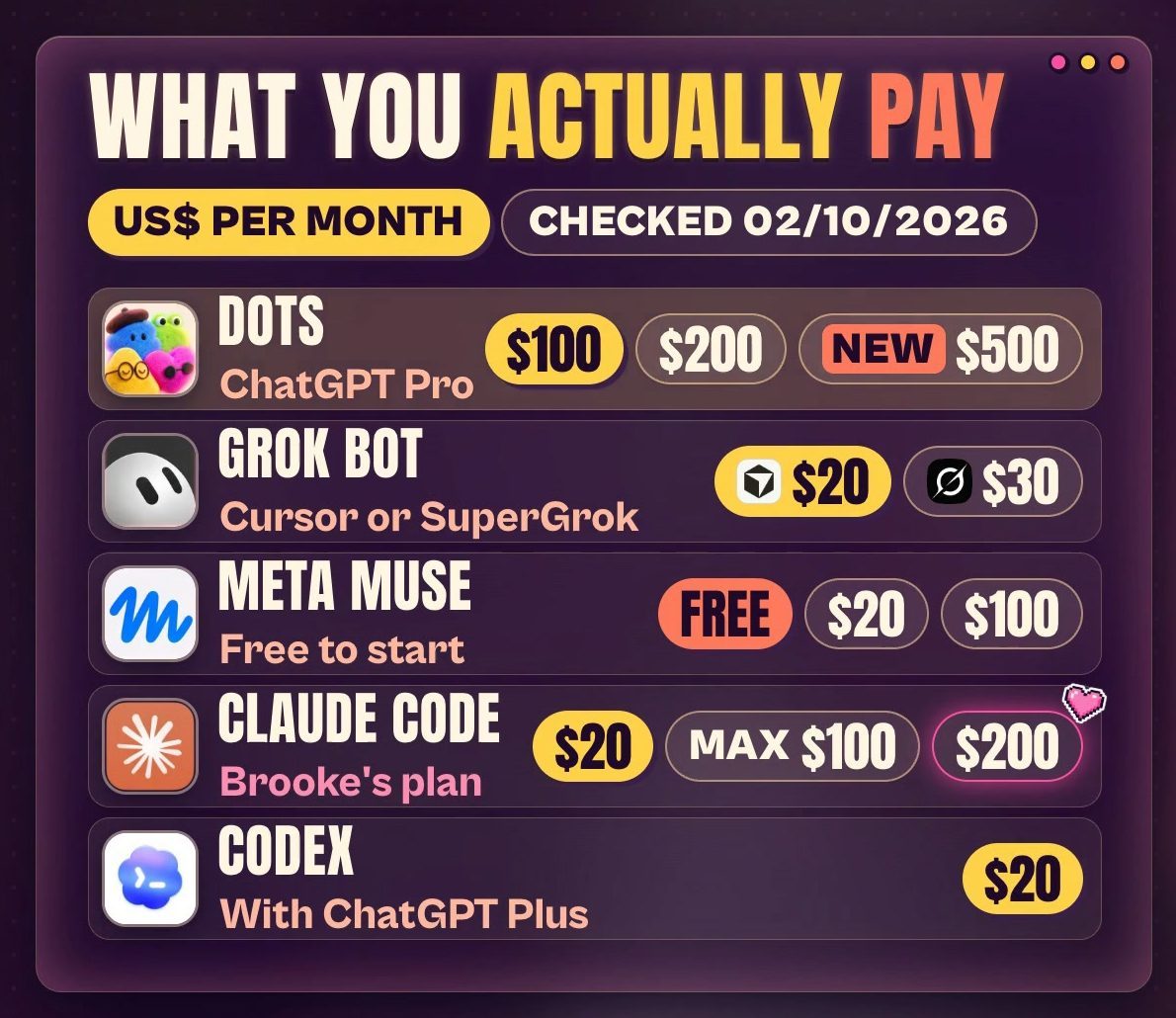
Advertised US dollar prices, checked 02/10/2026:
- ChatGPT Dots: you need ChatGPT Pro, from $100 a month. It's also on the $200 and new $500 Pro plans. ChatGPT Plus isn't listed for Dots.
- Grok Bot: through Cursor on its $20 Pro plan, or a SuperGrok plan from $30. If you pay for both, Cursor's own billing pages say the Bot allowances don't add together.
- Meta Muse: a free plan, then $20 or $100 a month.
- Claude Code: from the $20 Claude plan. Max starts at $100, and I'm on the $200 plan.
- Codex: included with ChatGPT Plus at $20, with limited access on the Free and Go plans too.
All of these have limits on how much you can use. Included doesn't mean unlimited.
Hermes: free software, not a free bill
Hermes is different. The software (the harness) is free to download. What it costs depends on what you plug into it.
If you wanted to use Claude with Hermes, you can't use your subscription's included usage. Hermes's own docs list Claude through a Max plan with extra usage credits, or through an API key, and API billing is a lot higher. My rule of thumb: subscriptions are heavily subsidised right now, so $25 of Claude API credit gets you a lot less than a $20 Claude plan.
Then there's hosting. If you want Hermes running 24/7, you need a server, like a Hostinger VPS. Plans start from US$6.49 a month on an intro deal, and that price renews higher.
So the cheaper-looking option can still give you the bigger bill.
What are tokens?
Tokens are little pieces of text that the AI processes. They're not a word count, and they don't map one-to-one with words. So don't compare a huge token number from one company with another company's allowance and assume they're equivalent. Models break text into tokens differently, and some charge separately for input and output tokens.
How to choose your first AI agent
Ask yourself which of these sounds like you.
"I want it easy. I don't want the headache of connecting tools. I just want it to run." Look at the managed products first: Grok Bot or Dots. Dots is a little buggy at the moment with the one agent, but it's very, very new and they'll keep improving it. Start with the one you can get through a plan you already have. If you already pay for ChatGPT Pro, start with Dots. You don't need Grok Bot as well.
"I want to choose the parts and manage the setup." Look at Hermes.
"I'm working inside a folder of business files, or building websites or software." That's when you look at a harness like Claude Code or Codex.
FAQ
Do I need ChatGPT Pro to use Dots?
On a personal account, yes. When I checked on 02/10/2026, Dots needed a ChatGPT Pro plan, from US$100 a month (also on the US$200 and US$500 Pro plans). ChatGPT Plus wasn't listed. OpenAI also lists it for Business Premium and for Enterprise workspaces that have it switched on. OpenAI is rolling it out in phases, and its access page excludes the EEA, the UK and Switzerland, so an eligible account can still be waiting.
Is Hermes free?
The Hermes software is free and open source. Running it isn't: you pay for the model you connect (a subscription it supports, or API usage) and, if you want it on 24/7, a server to host it. A Hostinger VPS started from US$6.49 a month on an intro price when I checked, and that price renews higher.
Can I use my Claude subscription with Hermes?
Not your plan's included usage. Hermes's docs list Claude through a Max plan with extra usage credits, or through an API key, which is billed separately. I use my ChatGPT subscription with Hermes instead.
Do these AI agents keep working when my laptop is closed?
Dots, Grok Bot and Muse work on cloud computers, so cloud jobs keep running with your laptop shut. Any part of a task that needs a file or app on your own computer still needs that computer online. Claude Code, Codex and Hermes can run in the cloud too, but only when you've set them up that way.
Is Meta Muse available in Australia?
Not listed yet. Meta's latest announcement lists access in the US and Canada. I have early access, so check availability where you are before you plan around it.
Got an agent? Now give it a real job
Picking the agent is the quick bit. The part that decides whether it saves you time is the job you give it, the tools you connect and the approvals you keep for yourself.
That's what we work on inside Wright Mode, my membership for women running their businesses with AI. You get my tools, tips and templates, plus me in the community every day answering your questions. Bring the job you want off your plate and ask me which agent fits it.