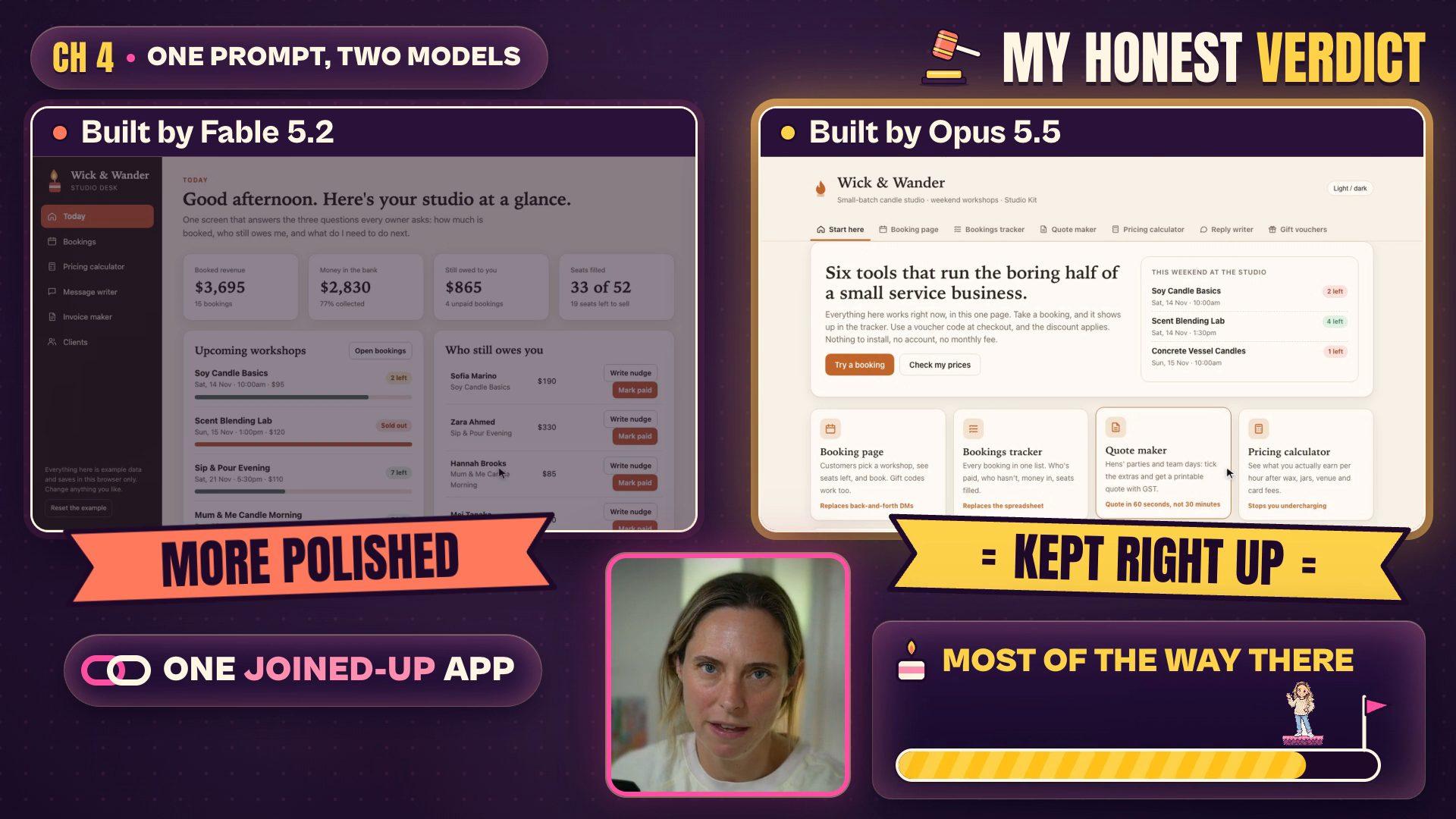
For most business work, start with Opus 5.5. Save Claude Fable 5.2 for big one-off jobs, like a whole website, a client dashboard or the full plan for a launch. I gave both models the exact same business prompt. Fable built a polished, joined-up studio app in 4 minutes 20 seconds. Opus 5.5 took 4 minutes 32 seconds, built a page with seven tabs to Fable's six, and honestly? It kept right up. And Fable uses your usage limits faster than other Claude models.
Anthropic released Fable 5.2 on 09/11/2026 (10/11 in Australia). Every launch video I watched was building video games and flying through 3D worlds. I wanted to know what it does for someone who runs a small business, so that's what I tested.
Every Claude screen in the video is a recreation Claude built in code. The two test pages are the real thing: Fable 5.2 and Opus 5.5 built them from one prompt, and I haven't touched them. Wick & Wander, the candle studio, is made up. I checked the facts in this post against Anthropic's launch page and its launch offers help article on 10/11/2026, and again on 11/11/2026.
What Anthropic says to use
Here's the bit nobody's leading with. The description on Anthropic's own launch video says:
"Fable 5.2 is best for the most ambitious, open-ended technical work. For most coding and knowledge tasks, we recommend starting with Opus 5.5."
That's from "Introducing Claude Fable 5.2" on the official Claude YouTube channel (09/11/2026). So before you switch everything over, know that the people who made Fable are telling you to start with Opus.
Can you get Fable 5.2?
If you're on a paid plan, yes. Pro, Max, Ultra, Team and Enterprise all have it. The free plan doesn't.
To use it, click the model picker under your message box, choose More models, then pick Fable 5.2. Anthropic hasn't changed your default model, so Fable only runs when you choose it.
It starts on Medium effort, which is Anthropic's default in the Claude apps and Claude Code. Leave it there. I'll show you why in the usage section.
What Fable 5.2 actually is
Anthropic makes a few different models. Opus is the everyday workhorse, and it's what most of us are using right now. Fable is the big one, the frontier model, built for the hardest jobs.
The easiest way I can explain it: Opus 5.5 is your reliable everyday car. Fable 5.2 is the hot rod. It's faster on a big open road, but it drinks a whole lot more petrol, and the petrol is your usage.
The launch headlines are wild. Anthropic says a team of 1,000 Fable 5.2 agents formalised Fermat's Last Theorem (it wrote out a famous maths proof so a computer could check every step) in 30 hours. Claude also designed three working gadgets with a circuit board company called Diode. Very cool. Is any of it practical if you run a business? No.
You might also see Mythos 5.2 in the news. It's the same underlying model without some of Fable's cyber security and biology safeguards, so only organisations accepted into Anthropic's Cyber or Life Sciences Verification Programs can use it. You can't get it, and you don't need it.
The three numbers that matter for a small business
Anthropic published a big table of test scores with the launch, and most of it is coding and science. I pulled out the three that matter if you run a business.
| Test (closest to) | Fable 5.2 | Opus 5.5 | What it means |
|---|---|---|---|
| AutomationBench Business workflows | 51.4% | 42.5% | A big jump on Opus, but Google's Gemini 4 Carbon scored 53.9%. Fable didn't win this one. |
| Remote Labor Index Real freelance-style work | 41.3% (at High effort) | 21.3% | Nearly double. This is where big, messy jobs show the difference. |
| OSWorld 2.1 Claude using your computer and apps | 89.3% | 87.2% | Basically the same. You won't notice a difference. |
These are Anthropic's scores from its launch page, published 09/11/2026 and checked again on 11/11/2026.
AutomationBench is the closest thing on that table to your actual admin, and it's the one Fable lost. On the test nearest your day-to-day work, Google's model came out on top.
One quote I loved comes from Cognition, a company that tested Fable 5.2 early (it's on Anthropic's launch page): "Claude Fable 5.2 says it doesn't know things instead of hallucinating." For a business owner, that might matter more than any score in the table.
My real read: Fable 5.2 is a real step up when the job is big, messy and long-running. On everyday admin, it's not miles ahead. That matters once you see what it does to your usage.
One prompt, two models: what each one built
I gave both models one prompt a real business owner might type. Here it is, word for word, so you can try it:
I run a small service business. I'm going to show whatever you build to a few thousand women who run their own businesses, and most of them have never written a line of code. In under 10 minutes, build me the most useful things you can for a small service business. You choose what to make. Make them actually work, make them look good, and put them all on one page I can click through. Use a made-up business as the example: Wick & Wander, a small candle studio that runs weekend workshops.
I ran it once on each model in Claude Code on 10/11/2026, on my Max plan. Both got the same short note on top, telling them where to save the page and not to use the internet or install anything. Both could only read and write files.
What Fable 5.2 built (4 minutes 20 seconds)
Fable built a studio desk with six tools, all on one page:
- Today, a dashboard that answers the three questions every owner asks: how much is booked, who still owes me, and what do I need to do next. When I marked someone as paid, the numbers updated straight away.
- Bookings, with every workshop and every seat.
- A pricing calculator that asks "Is this workshop actually worth your Saturday?" Drag the sliders and it shows your real hourly rate and how many seats you need to sell to break even.
- A message writer for the five messages you send every week.
- An invoice maker that works out the GST for you (hi, Australian readers).
- A client list that builds itself from your bookings and tags your regulars, which is really clever.
What got me is that it all talks to each other. It feels like one app built for the person actually running the business.
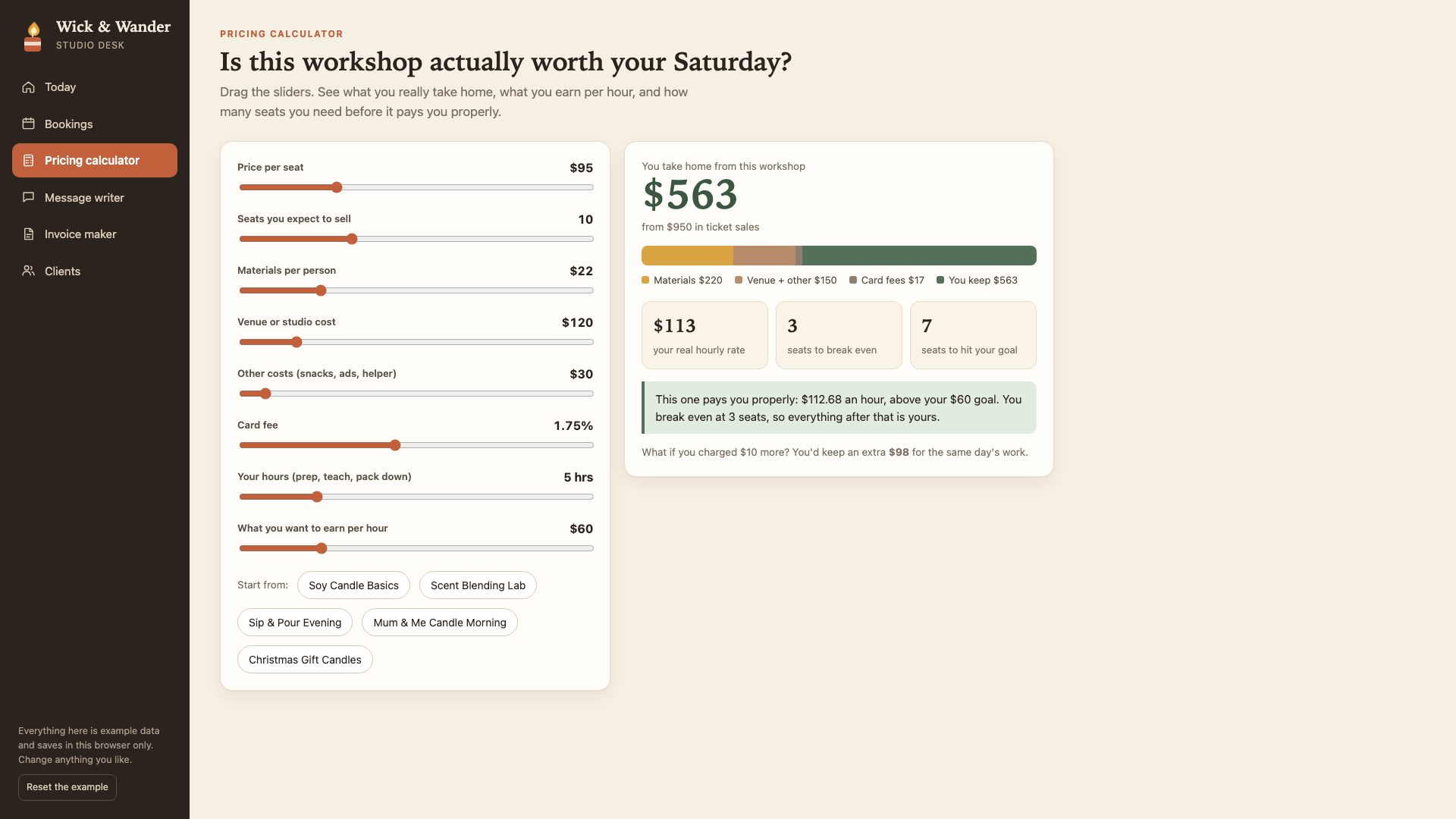
Built by Fable 5.2 from the prompt above. Everything in it is made-up example data.
What Opus 5.5 built (4 minutes 32 seconds)
Opus took about the same time and built more: seven tabs to Fable's six.
- Start here, a front page for "six tools that run the boring half of a small service business".
- A booking page your customers would actually use.
- A bookings tracker that shows who has paid.
- A quote maker for private events, like hens' parties. I thought this one was really cool.
- A pricing calculator called "Am I charging enough?"
- A reply writer, including one for when someone tells you you're too expensive.
- A gift voucher maker. Just in time for Christmas.
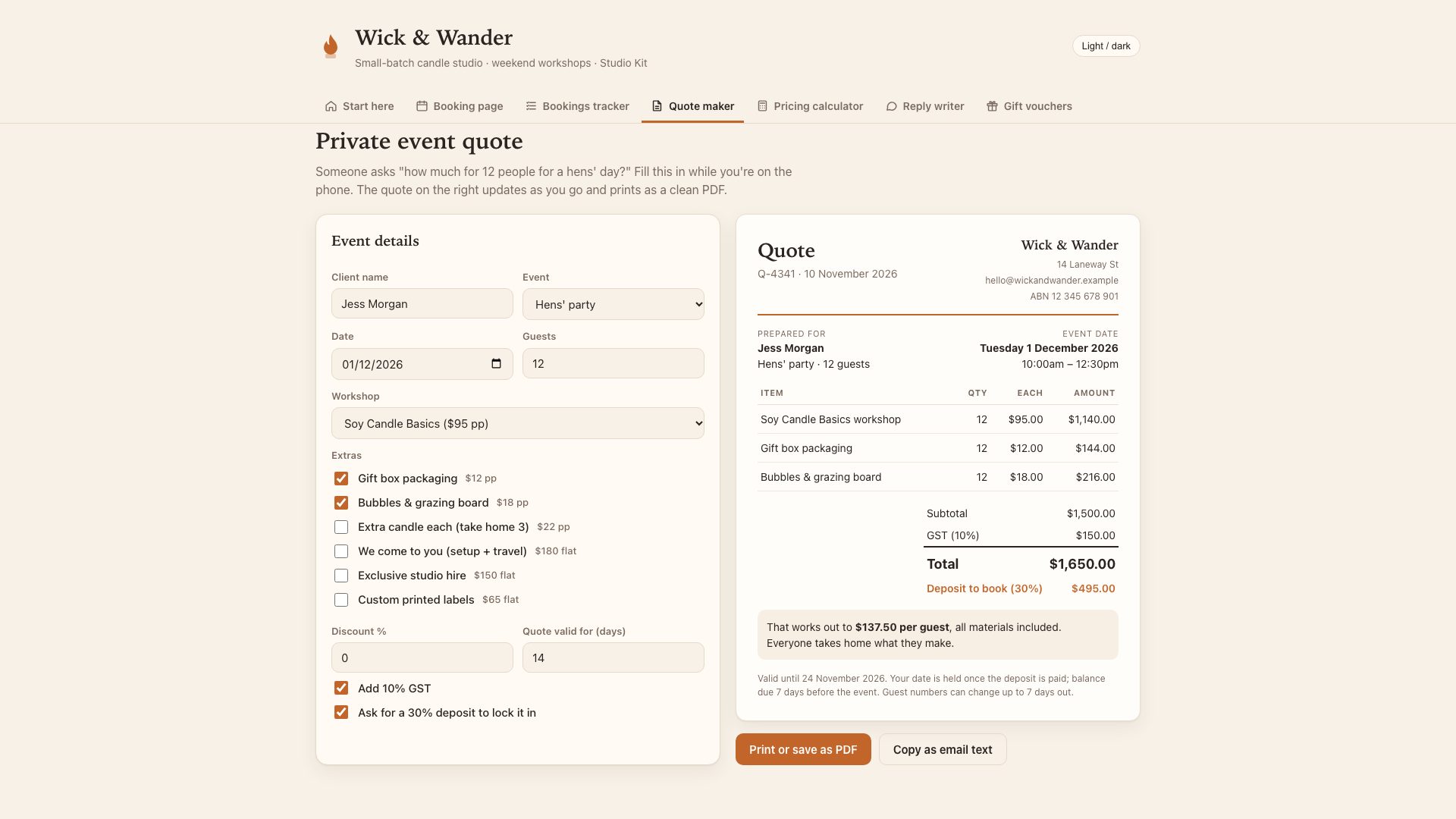
Built by Opus 5.5 from the same prompt. Also made-up example data.
My honest verdict
Fable's version looks more polished and feels like one joined-up app. Opus kept right up, and for this small business example, it got me most of the way there. Either way, you could run a design skill over the page afterwards to make it look nicer.
So for a job like this, Opus 5.5 is enough, which is pretty much what Anthropic says too.
If you're reading this thinking "I'd love that for my business" or "I'd love to build these for clients", but you wouldn't know where to start, that's what my Wright Mode membership is for. It's almost 300 women business owners learning to use AI to save time and make more money. There's a whole course on building your website step by step, and I'm in there every single day answering questions.
What Fable 5.2 does to your usage
Anthropic's help centre says it straight out: "Fable models use your usage limits faster than other Claude models." And people are feeling it. One of the top comments under a big Fable launch video, with 98 likes, says: "I hit my limit by just watching."
If that's happened to you, you're not imagining it.
The Pro free week ends 16/11/2026
On Pro plans and standard Team seats, from launch until 16/11/2026 at 11:59 pm Pacific time, you can use up to 50% of your weekly usage limits on Fable at no extra cost. In Australia, that ends at 3:59 pm on 17/11 in Perth, or 6:59 pm in Sydney.
After that, Fable runs on usage credits, if you've turned them on. So if you've got one big job for Fable, do it this week.
Reading this after 17/11/2026? That offer has finished. Everything else in this post still stands.
How to claim your free reset
You also get free limit resets, which is a really nice bonus.
- Open Settings, then Usage.
- Under Limit resets, click Reset for free.
A reset gives you back the usage you've spent on Fable this week. If your plan has a five-hour limit, it refills that whole window too. It doesn't make your limit any bigger, and your weekly usage on other models stays where it is.
How many you get depends on your plan:
- Pro and standard Team seats: 1 reset. It expires 16/11/2026 at 11:59 pm Pacific time.
- Max, Ultra and premium Team seats (plus premium seats on legacy Enterprise plans): 1 to 3, depending on how long you've been paying for Claude. Under 6 months gets 1, 6 to 12 months gets 2, and over 12 months gets 3. These expire 08/03/2027 at 11:59 pm Pacific time, which is the afternoon of 09/03 in Australia.
Resets only go to accounts that had paid billing in place before 09/11/2026 at 10 am Pacific time.
Why I leave it on Medium
Higher effort gives you more thorough answers, but it takes longer and uses your limits faster. In my app, Max effort even comes with a warning: 4× or more usage.
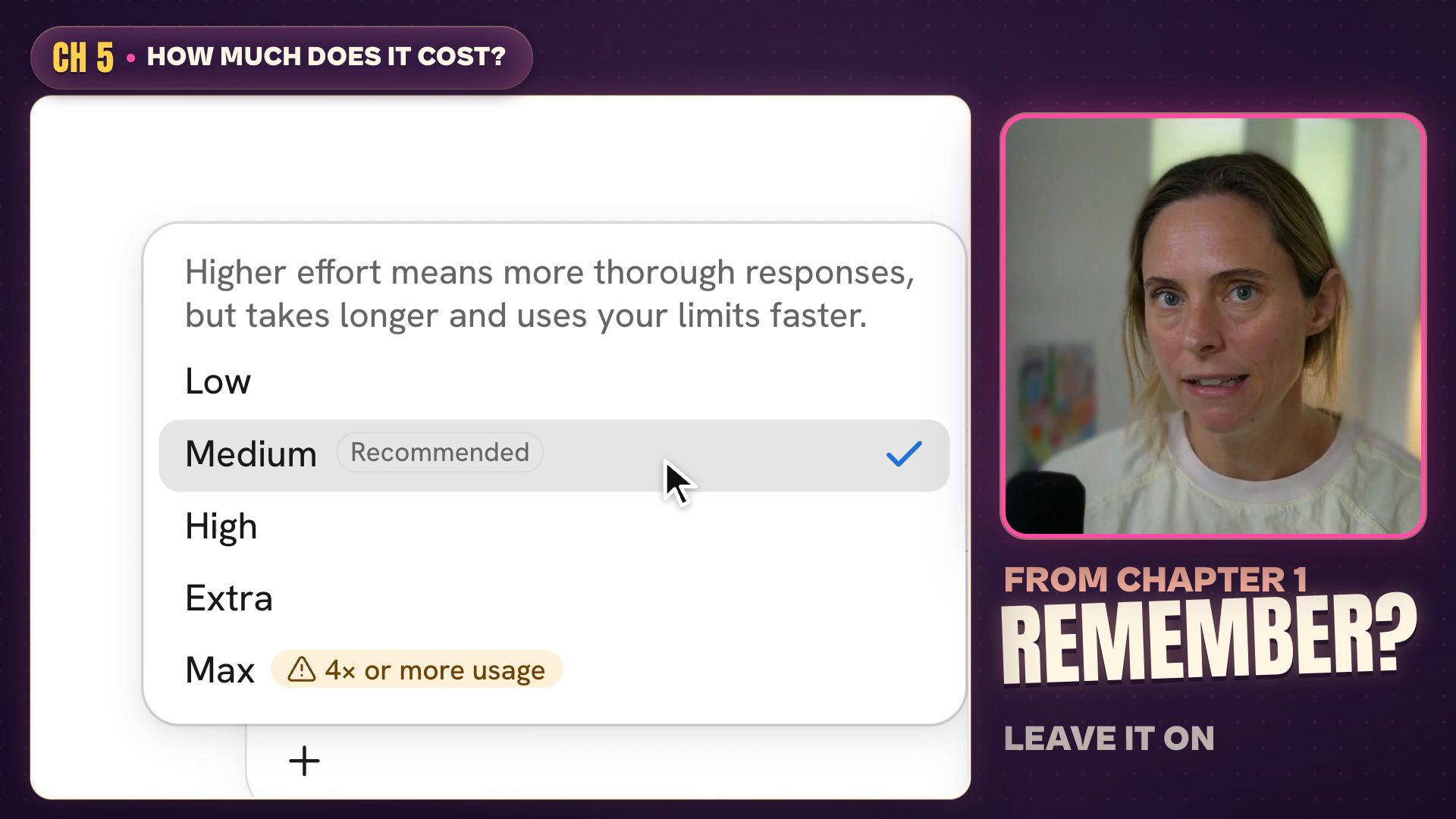
The effort menu, recreated in code from my Claude app.
Anthropic's own numbers show you often don't need more. At Low effort, Fable 5.2 matches Opus 5.5's top score on a test called Humanity's Last Exam for less than a tenth of the cost per task. At Medium, it matches Opus 5.5's top score on another test, WANDR, for about 40% of the cost per task. Those are API costs per task on two tests, not your plan usage.
So cranking it up to Max mostly just burns usage. Most of the work business owners do doesn't need Max Fable.
When to use Fable 5.2 vs Opus 5.5
My rule: Fable is for your big one-off jobs. Opus is for everything you do every week.
| The job | Use | Why |
|---|---|---|
| A whole website | Fable 5.2 | A big one-off build. In Claude Code, you can set it as a goal with a clear finish line. |
| A client dashboard | Fable 5.2 | Another big one-off build. |
| A full launch plan, including the email sequence | Fable 5.2 plans it, Opus 5.5 writes it | The planning is the bit worth your Fable usage. |
| A big idea AI has struggled with before | Fable 5.2 | It's built for ambitious, open-ended work, like a really hard coding or knowledge task. |
| Emails, content and little admin jobs | Opus 5.5 | Everyday work. This is what Opus is for. |
| Routines and scheduled tasks | Opus 5.5 | They run every week, and you don't want them burning Fable usage on basic stuff. |
| Not sure? | Opus 5.5 first | If it's struggling, move up to Fable and see how it goes. |
The trick: plan with Fable, do it with Opus
This one's going to save you heaps. Ask Fable to write the plan for a big job, and tell it another model will do the work, so every step has to be clear enough to hand off. Then start a new chat, switch to Opus 5.5 and give it the plan.
That way Fable does all of the planning and Opus does the actual work, which is heaps more cost effective. I do something similar for any Claude Code build as a non-technical founder: I plan it in a normal chat, ask Claude for a handover document, then give that document to Claude Code to build from.
I've put both prompts for this (plus five more) in my free Fable 5.2 guide, ready to copy, along with a "Fable or Opus?" cheat sheet.
Your first week with Fable 5.2
- Open a new chat and pick Fable 5.2. Leave it on Medium.
- Pick one big job you've been putting off, or one AI has struggled with. Think of something that would normally take you a whole day.
- On Pro? Do it before 16/11/2026 (17/11 in Australia), while it's covered by the free week.
- Check Settings, then Usage, before and after. See how much of your Fable usage that one job took.
FAQ
Can I use Claude Fable 5.2 on the free plan?
No. Fable 5.2 is on the Pro, Max, Ultra, Team and Enterprise plans, and the free plan doesn't include it. The launch offers and free resets aren't available on the free plan either.
Why won't Claude switch to Fable 5.2?
If it won't switch in a chat you've already got going, start a new chat and pick Fable 5.2 from the model picker there. One commenter under a launch video couldn't switch models, opened a new chat and found their free reset waiting. If Claude says you've hit a limit, check Settings, then Usage, for a free reset.
Should I switch from Opus 5.5 to Fable 5.2?
Not as your everyday model. Keep Opus 5.5 for emails, content, admin and anything that runs every week, and pick Fable 5.2 when you've got a big one-off job. Anthropic recommends starting with Opus 5.5 for most coding and knowledge tasks too.