In the recorded demonstration, I loaded creator frameworks into NotebookLM and generated a first research summary in about 30 seconds. Checking that summary against the original videos is a separate step.
Import public captioned videos, ask about the ideas discussed, then check each useful finding against its original source. YouTube URL imports supply transcript text, not visual inspection of the video or thumbnail. Google’s source guide explains the limits.
If you're a content creator, this might be the single highest-ROI tool you're not using yet. Here's the system, end to end.
What NotebookLM actually does
NotebookLM is Google's AI notebook. You load it with sources — YouTube videos, PDFs, Google Docs, web pages — and it indexes the supported source content and lets you ask questions or generate things based ONLY on those sources.
The useful part for content creators: load your favourite creators' videos as sources, and NotebookLM becomes a research engine grounded in the patterns they discuss. Hook frameworks, scripting structures, title formulas, thumbnail principles — extracted from the channels actually crushing it on YouTube, not random Internet advice.
And because it's grounded in your sources, the output isn't generic AI slop. It's the actual patterns from the actual creators you trust.
The setup — load your sources
Open NotebookLM. Hit New Notebook. Then add sources.
For a content research notebook, the source mix that works:
- 10-15 YouTube videos from creators in your niche who are working
- 2-3 of your own best-performing pieces (so the patterns are tuned to your voice)
- Any frameworks docs you trust (Hormozi's lead magnet framework, Pat Flynn's audience research, anything you've collected)
YouTube imports use the captions available for eligible public videos. If a video lacks usable captions or the import fails, use a transcript you are authorised to upload. Check that the source finished importing before asking about it.
The custom system prompt (don't skip this)
Before you start asking questions, set a custom prompt in the notebook settings. Use the instruction field and limit available in your account.
My approach to improving the instructions: reverse-engineer the prompt in Claude or ChatGPT first.
"I'm setting up a NotebookLM for YouTube content research. The notebook has 15 videos from creators teaching scripting, hooks, and thumbnails. Write me a system prompt that gets NotebookLM to extract repeatable frameworks, suggest improvements to my content, and provide guidance for a [your niche] channel."
Paste the result into NotebookLM's custom prompt field. Every question you ask the notebook from now on runs against that prompt. Your output goes from "generic summary" to "actually useful frameworks tailored to your channel."
The four queries that build a content engine
Ask the notebook these four questions, in this order. Each one creates a note, which you then convert to a source — so you can reuse your working notes. Keep their original citations: generated notes are interpretations, not independent evidence.
1. Hook framework
"Analyse the sources and create a repeatable hook framework for my niche. Surface the most-used patterns, with examples."
NotebookLM will pull patterns across all 15 videos (the trust ladder, the contrarian opener, the specific-number hook, etc.). Save as a note. Convert to source.
2. Scripting framework
"Create a repeatable scripting framework based on the sources. Cover structure, pacing, and where CTAs land."
Same pattern. Save as note. Convert to source. Now NotebookLM has your hook framework AND scripting framework available to reference in the next query.
3. Title formulas
"What title patterns are working across the sources? Give me 10 examples per pattern."
Save, convert.
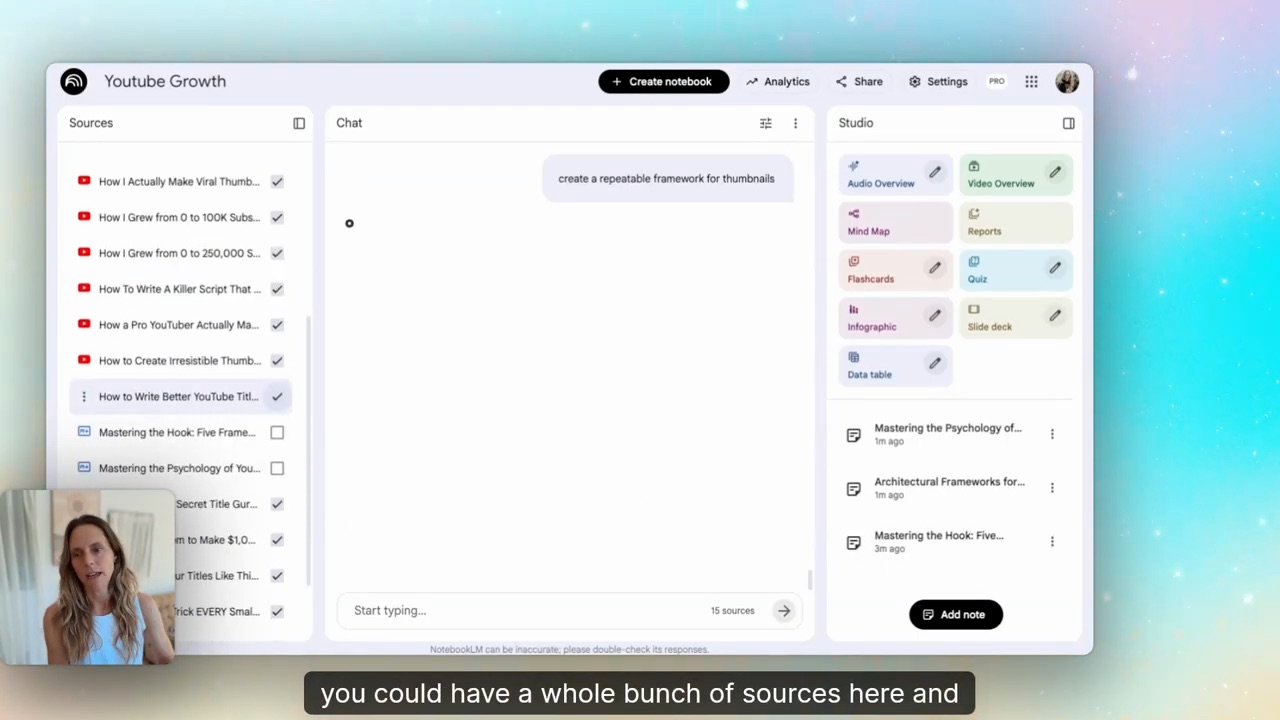
4. Thumbnail principles
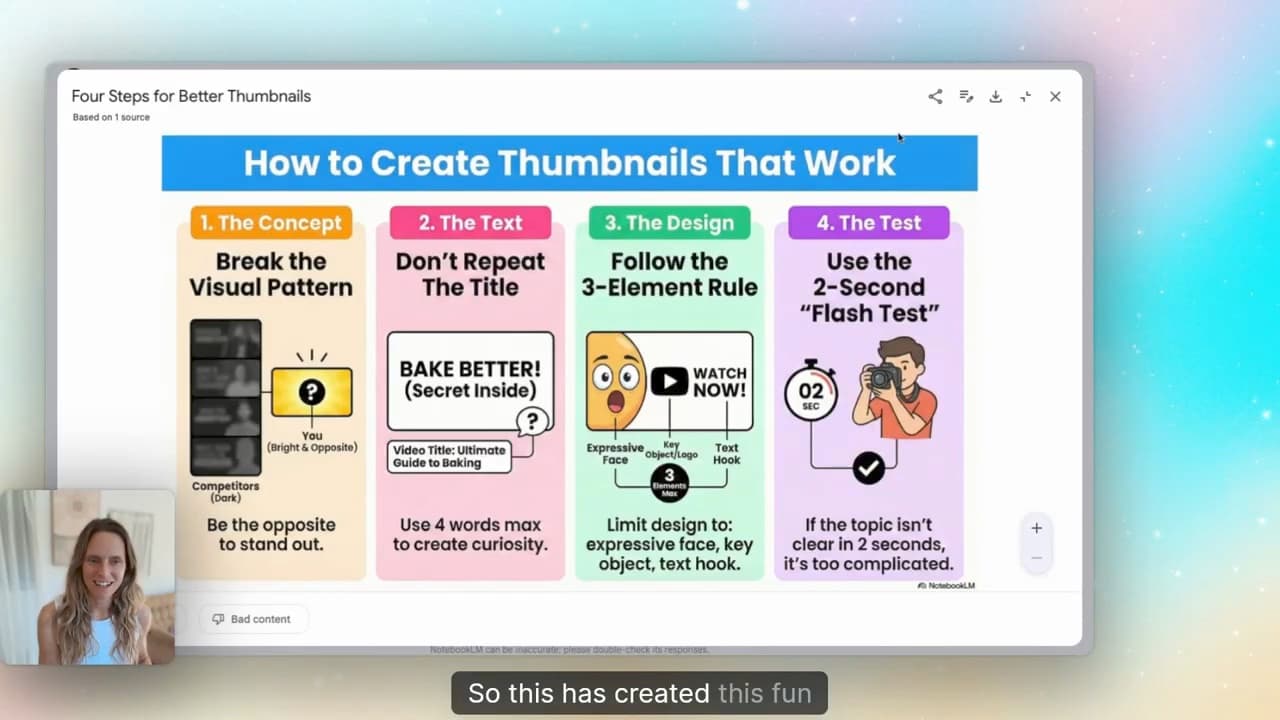
Ask for principles discussed in the transcripts. A YouTube URL alone does not give the notebook the actual thumbnail to analyse. Supply the relevant images separately in a supported format and verify what was imported if you want to discuss visual examples.
"What thumbnail principles repeat across the sources? Cover visual patterns, text, and design rules."
Save, convert.
By the end you have four foundational frameworks loaded as sources in the notebook. Now ask NotebookLM to help you make your actual next video — "I'm making a video on [topic]. Use the frameworks to give me a title, hook, script structure, and thumbnail concept." It uses all four frameworks together to give you a coordinated answer.
The interactive podcast (the part everyone sleeps on)
NotebookLM has an audio overview feature — it generates a podcast of two AI hosts discussing your sources. Recently they added the ability to interrupt the podcast and ask questions live.
That's a research workflow:
- Generate the podcast on whatever angle you're researching ("focus on what a new YouTuber needs to know about scripts, hooks, titles, and thumbnails")
- Make it 5-15 mins long
- Listen on your walk
- Interrupt with questions as they come up ("wait — what did Mr Beast actually do for that first viral video?")
- The AI hosts pause, answer, then keep going
It's the most useful "consume your sources" mode I've found. Better than reading notes. Better than skimming transcripts. You're being talked through your own research while walking.
Generate infographics, slide decks, mind maps
The same Q&A box that generates notes can generate visual outputs:
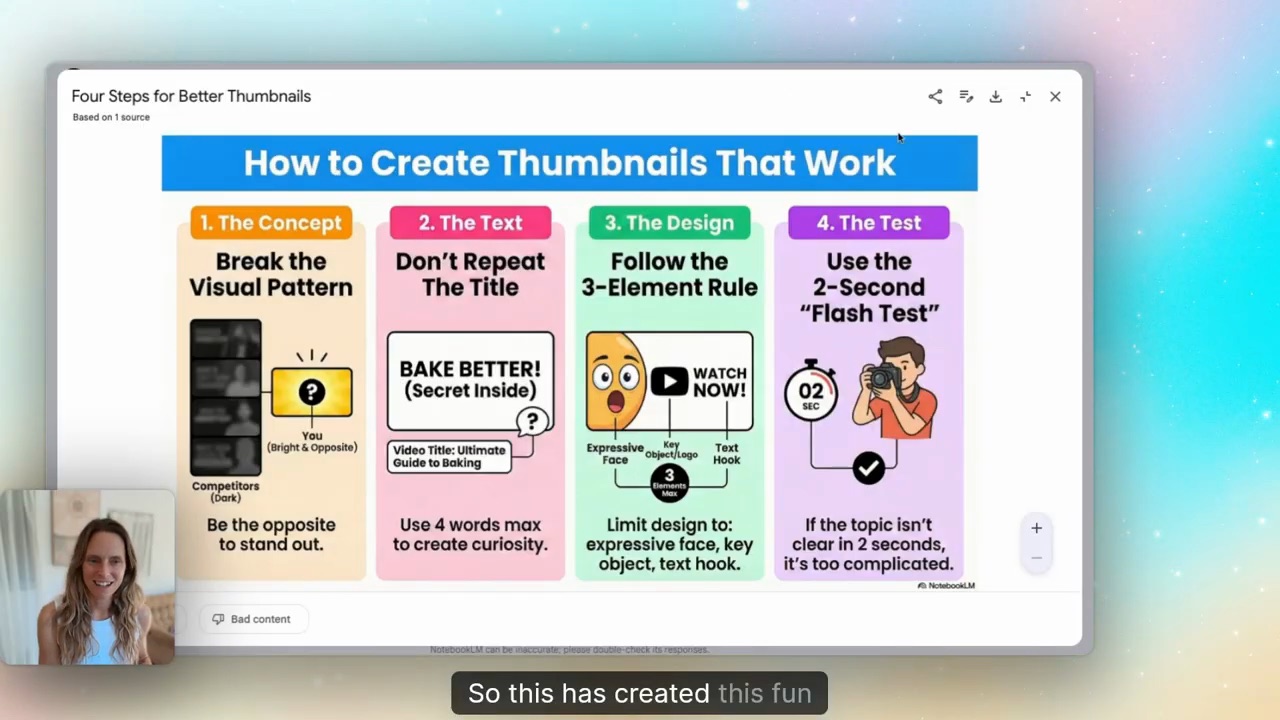
- Infographics — "make a colourful infographic explaining the four principles of YouTube thumbnails using the sources"
- Slide decks — useful when you want to teach the material to someone else
- Mind maps — for getting the shape of a topic in your head
- Flashcards — if you're trying to memorise anything (creators rarely need this, but workshop facilitators do)
You're not using AI to write generic content. You're using it to synthesise the patterns from the specific creators you've chosen to study into formats you can actually use.
How this connects to your wider AI content stack
NotebookLM is the research layer. It's not your writing tool, it's not your scheduler. Where it fits in a real content system:
- Research: NotebookLM (the patterns + frameworks from your creators)
- Writing: Claude or ChatGPT with your voice baked in
- Repurposing: n8n workflow that turns one TikTok into branded Instagram carousels
- Distribution: A scheduling tool (Blotato, Buffer, etc.)
NotebookLM is the bit that stops your content from sounding like everyone else's — because the patterns you're building from are specifically the patterns of the creators you've chosen, not the entire internet.
(If you want the bigger thinking on AI content systems, the Claude skill systems post covers how to wire NotebookLM-style research into a full content production chain.)
FAQ
What is NotebookLM and how does it differ from ChatGPT?
NotebookLM is organised around the sources you select and helps you trace answers back to them. ChatGPT can also work with uploaded sources and other tools. Choose based on the task and check citations in either; a tool name alone does not make an answer accurate.
Is NotebookLM free?
NotebookLM has a free option and paid options with different allowances. Check the limits shown for your account before importing a large research collection. This workflow does not depend on promising a fixed number of free sources or outputs.
Can NotebookLM transcribe YouTube videos automatically?
No separate whole-video transcription is performed for this import. Eligible public YouTube URLs provide existing captions as text. Check Google’s source guide above and provide an authorised transcript when captions are unavailable.
How is NotebookLM different from Poppy AI?
This article demonstrates NotebookLM research, not a current head-to-head Poppy test. Compare source support, workflow, limits and current pricing on a task you use before paying for another tool.
Can I share my NotebookLM notebook with my team or clients?
Yes — you can share notebooks the same way you share Google Docs. This makes NotebookLM useful as a client deliverable — you build a notebook for a client (their competitor research, their brand voice frameworks), share it as a link, they can chat with it themselves. Some consultants use this as a lead magnet.
If you want to actually build a content system that uses NotebookLM for research, Claude for writing, and n8n for distribution — that's what we do inside Wright Mode. Monthly Build-with-Brooke sessions where we wire workflows like this end-to-end, plus the templates I use in my own business.