Start with a booking or form submission, apply one simple rule, then send the result where you already work. These four recorded examples show that pattern. Pick the intake workflow first; adding AI research comes after the basic handoff works.
Most founders I work with come to me overwhelmed. They've heard "automate everything," tried, hit a wall in Zapier or n8n, given up.
The mistake isn't the tools. It's starting with the wrong problem. Strategy first — figure out which 3-4 repeatable things in your business are eating your time. Then automate those, one at a time, simply.
These are four automations from my recorded setup. Build time refers to that setup, after accounts and connections were available. For your first workflow, allow time for credentials, testing and delivery checks too.
Tool choice first — Zapier vs Make vs n8n
Quick honest framing before the automations themselves.
- Use what you've got. Most software you already pay for has automation features built in. Don't change systems before you've used what's in front of you. Sometimes the right answer is "pay $20/month for the native integration" not "build it in n8n."
- For simple one-step automations: Zapier is fine. I still use it. My Fathom transcripts auto-save to Google Drive via a one-line Zap — took me a minute to set up and there's no reason to rebuild it in n8n.
- For complex / multi-step / custom workflows: n8n is the best tool. It's where I build anything with AI agents in the loop, or anything that needs to branch on logic.
- For beginners: start in Make or Zapier. Their interfaces are gentler than n8n. Graduate to n8n when you outgrow them — you'll know when.
Automation 1 — The consult intake form
The pattern: someone books a call, gets an automated email with an intake form, fills it in, my prep work is half-done before the call.
The setup:
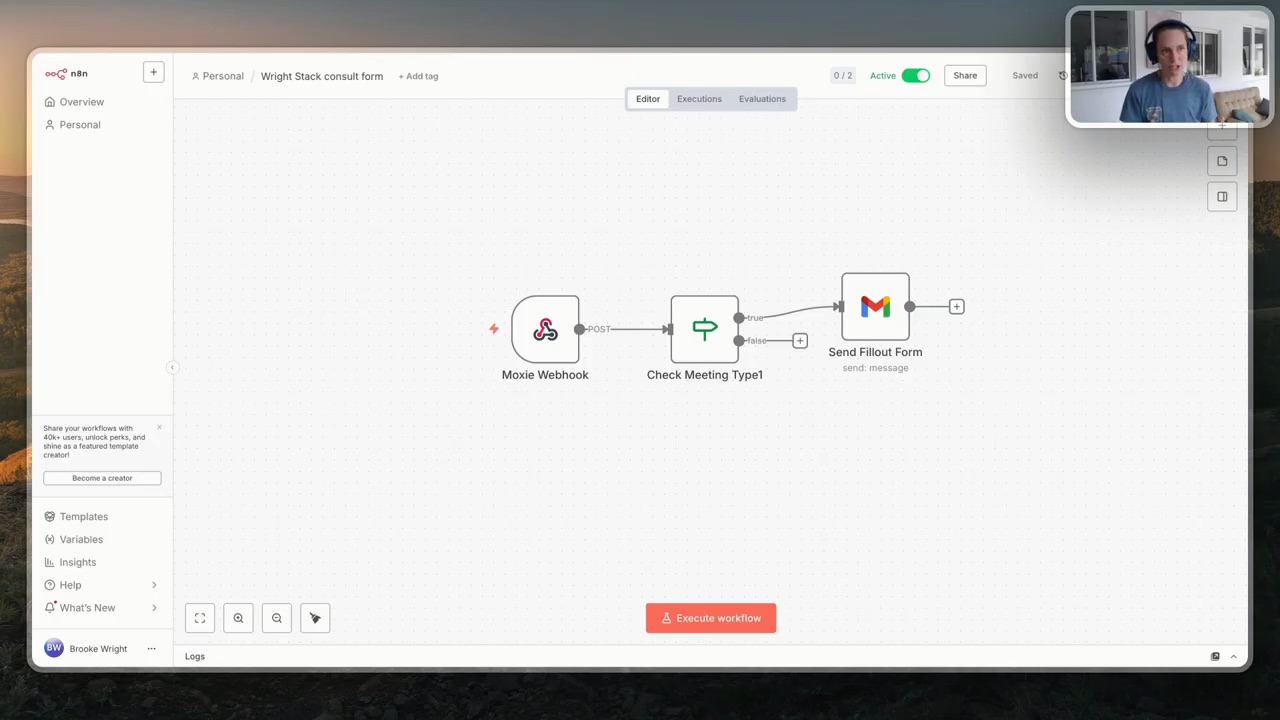
- Trigger — webhook from my CRM (Moxy) fires when someone books a 90-minute consult
- Filter — only continue if the booking type = "90-minute consult"
- Action — send a personalised email from me with thank-you, prep instructions, and a detailed intake form
Why not just use my CRM's built-in confirmation emails? Two reasons:
- The intake form is detailed — far more than a CRM's "booking confirmed" auto-reply would carry. I want detailed information BEFORE the call so I can actually prep, not gather information during it.
- I want the data in a format AI can use. My CRM's form output doesn't export cleanly to Google Sheets. So I use a separate intake form (Google Form, Tally, anything) that saves submissions to a Google Sheet — which becomes the trigger for automation #2.
That second point is the bit most people miss. Sometimes you build a separate workflow not because the existing one doesn't work, but because you want the data shaped for what comes next.
Automation 2 — Intake form → AI research agent → Slack + Notion
This is where I add research to the basic handoff.
Trigger: a new row in the Google Sheet (someone filled in their intake form).
Then an AI agent kicks in:
- The agent's brain: OpenAI chat model
- Tools attached: Perplexity (for web search), Slack (for messaging me)
The agent reads the intake form, then researches the company online — what they do, what tools they use, what other people in their industry are doing with AI. Builds a one-pager. Drops the research into Notion. Pings me in Slack saying "I've done some research for your consult, find it in Notion."
The difference between this and a regular automation: the agent decides what to research and how. A normal automation would follow rigid steps. An AI agent reads context and adapts.
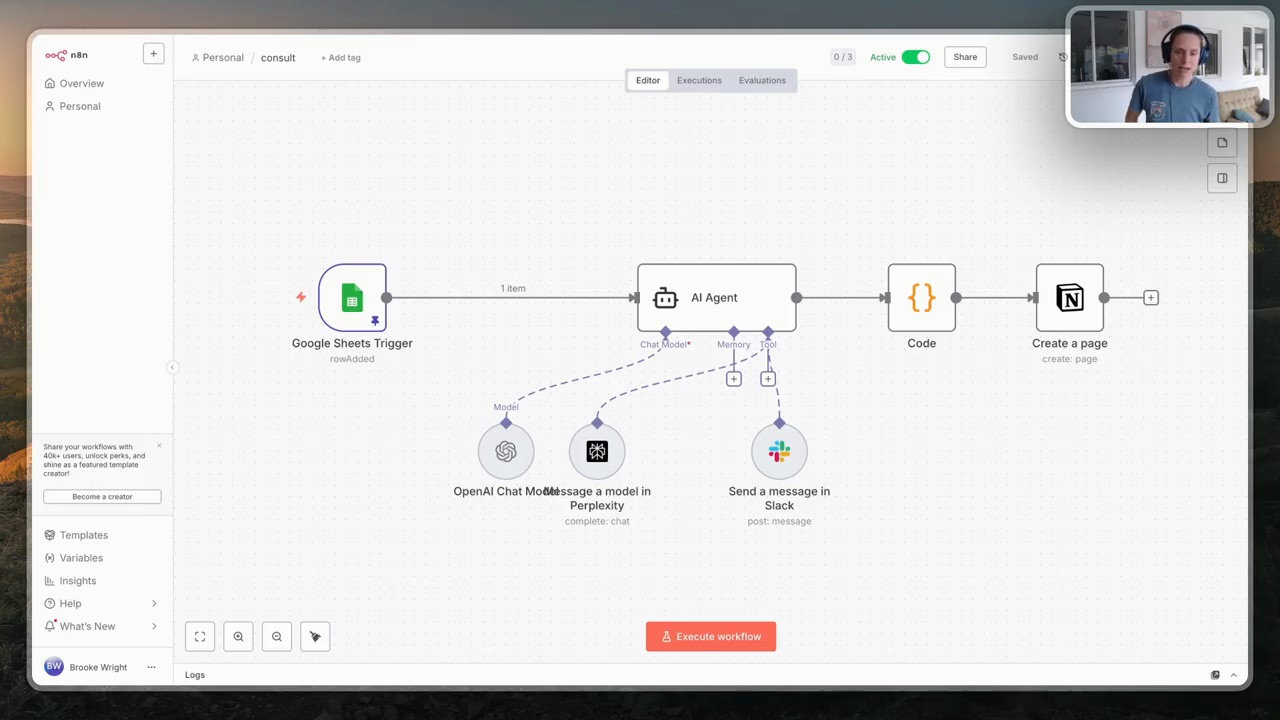
What this saves: 30-45 minutes of pre-call research per consult. Across a month, that's hours.
Automation 3 — Membership application → personalised email
This section shows a former application workflow, when my site used Squarespace and a Google Sheet collected form answers. It is not today’s membership admission process. Beginners are welcome in the current Wright Mode membership.
The reusable idea is tailored onboarding: collect someone’s starting point, match it to an appropriate first resource, and send a helpful next step. Test each answer branch with a sample submission before activating email delivery. Keep one submission ID so a retry does not send the same welcome twice.
Automation 4 — The PR opportunity scanner
This is the simplest and possibly highest-impact one I run.
I'm signed up to a few PR opportunity lists — daily emails about journalists looking for sources, podcast hosts seeking guests, that sort of thing. You need to act fast. I always forgot to check them.
The fix:
- Trigger: scheduled (twice daily)
- AI agent reads my Gmail, filters for emails from specific PR senders
- Determines whether any opportunity is a fit for my industry (AI, automation, women in business)
- Pings me in Slack with the relevant ones — or "no PR fits today"
I don't open the PR emails. I don't even check my inbox for them. Slack just tells me when there's something worth acting on.
This took me an hour to build. It's gotten me on multiple podcasts. The ROI is genuinely uncountable because I'd never have caught those opportunities manually.
The pattern across all four
Look at what these automations have in common:
- The trigger is always something that already happens — someone books, fills in a form, receives an email. I didn't add new behaviour, I attached automation to existing behaviour.
- Each one is 2-4 steps max. None of them are sprawling 20-node monsters. Simple wins.
- The output goes to where I already work — Slack, Notion, Google Sheets. Not "another dashboard I have to remember to check."
- AI agents are added where genuine reasoning is needed (research, fit-assessment, filtering). Rule-based automation handles the rest.
This is the actual framework: find a repeatable pattern → trigger off something already happening → keep it simple → output to where you already are.
What to build first
If you've never built an automation, don't start with the AI agent ones. Build automation 1 first — a webhook (or form-submission trigger) that fires a templated email. That's a 20-minute build. It teaches you triggers, filters, and actions in one go.
Then build automation 4 — the simplest AI agent version — once you have the muscle memory.
By the time you build automation 2 (research agent with multiple tools attached), you'll know what you're doing. Trying to build it first will just make you bounce off n8n.
(For the broader thinking on how multiple automations + AI skills chain together into actual business systems, see Claude skill systems: how to wire skills together into real workflows. Same framework applied at the AI-skill layer.)
FAQ
What's the difference between automation and an AI agent?
Automation follows a strict step-by-step recipe — if A happens, do B, then C, then D. If any step fails, the chain stops. AI agents get given data + tools + a system prompt, and decide for themselves what to do. They can branch, research, and reason. Use automation for predictable workflows, agents for ones that need judgement (filtering, research, fit assessment).
Do I need to know how to code to build these automations?
No. All four of these are built in n8n's visual workflow editor — you drag nodes, wire them up, fill in fields. The hardest part is thinking clearly about the steps. The technical wiring is filling in text boxes.
Which is cheaper, Zapier or n8n?
Compare n8n pricing with Zapier pricing for your expected runs and required integrations. Self-hosting also has hosting and maintenance costs. Pick a simple reliable connection before optimising a small subscription difference.
Can I really build a PR opportunity scanner that reads my email?
Yes — and it's one of the simplest builds in n8n. The Gmail node has filters (senders, subject keywords, time range). The AI agent node lets you give it a system prompt ("here's what counts as a PR fit for my business"). The Slack node sends you the result. Three nodes, maybe four with a scheduler.
How long does it take to build my first n8n workflow?
If you're starting from scratch (no n8n account yet, no API keys connected): plan on 90 minutes for your first one. The mental model takes 30 mins to click. After that, similar workflows take 20-30 minutes each. By workflow #5 you're flying.
If you want help mapping out which automations would actually move the needle in your business, that's the kind of thing we do inside Wright Mode — monthly Build-with-Brooke sessions where we wire workflows up together, plus templates for the ones I run myself. If you'd rather strategy-first, book a Wright STACK Consult and we'll work through your STACK framework in 90 minutes.